Photo to Render
Photo to render is the process of turning a photo of a building, interior or site into a new photorealistic render with AI. You can change facade materials, furniture, lighting, sky and context while the geometry and camera angle of the photo are preserved — each render takes seconds in the browser with ArchiGPT's AI render tool.
No learning curve
No installation
Ultra fast and creative

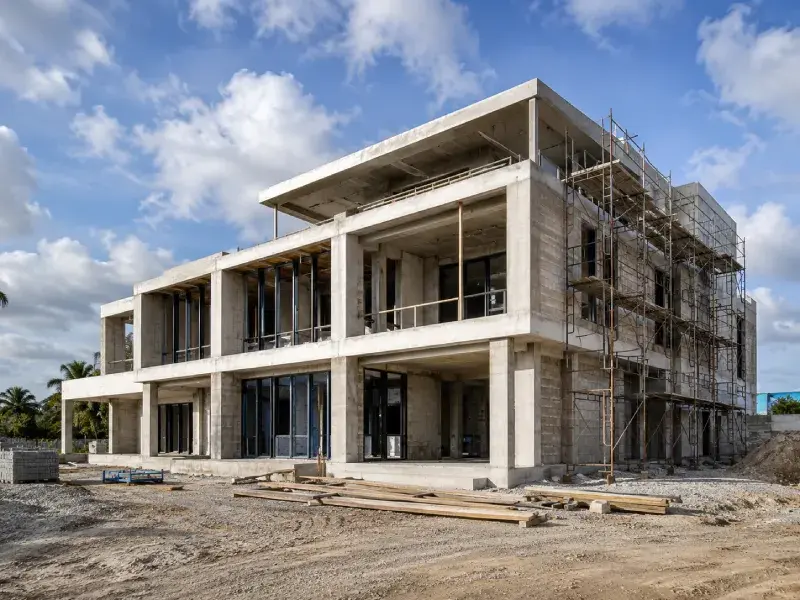
CONSTRUCTION PHOTO
RENDER
How Do You Turn a Photo into a Render with AI?
A photo is turned into a render in 3 steps: upload, describe, generate.

Step 1: Upload
Upload the photo as JPG or PNG — up to 4 images per generation.
Phone photos work — resolution and daylight are the two factors that most improve the output. Which photo to take, and how, depends on the photo type.

Step 2: Describe
Describe the changes in the prompt: materials, style, lighting.

Step 3: Render
Generate and download the render.
Which Photo Types Work Best for Rendering?
The photo types that work best for rendering are listed below.

Exterior building photo
The base for facade and renovation studies — shoot straight-on in daylight with minimal obstruction from cars and trees.

Interior room photo
The base for restyling and staging — shoot from a corner at chest height so floor, walls and ceiling are all visible.

Empty site or plot photo
The base for new-building insertion — include the horizon and neighboring context for scale.
Construction-progress photo
The base for showing the finished state — shoot from the same angle as the planned marketing view.
Whatever the type, the first question most searchers bring here is whether a flat photo can gain depth.
Can a Photo Be Turned into a 3D Render?
Yes — a photo is turned into a 3D render in the sense that the AI regenerates the scene as a photorealistic, depth-correct image with new materials, lighting and context. It does not produce a 3D model file; it produces the rendered view. The photo's perspective supplies the three-dimensional structure, and the prompt supplies everything that changes on top of it.
What can change on top of it is a longer list than most first-time users expect.
Can You Tell an AI Render from a Real Photo?
Increasingly no — but five cues still separate renders from photos: perfectly straight verticals with no lens distortion, repeating texture patterns, surfaces without wear or dust, lighting that is uniform from every angle, and entourage (people, plants, cars) that looks slightly too clean. High-end AI renders now control all five, which is why the question has its own search volume.
For professional use the rule is simple: realism is the goal, disclosure is the practice — renders used in listings and marketing are labeled as visualizations where local rules require it.
What Can You Change in a Photo Render?
Four categories can be changed in a photo render: facade materials, interior style, lighting, sky and landscape context.

Facade materials and textures
Brick, plaster, timber or metal panels are swapped by naming them in the prompt.
One scenario deserves its own instructions, because the photo contains nothing but land.

Interior style and furniture
The furnishing and style of a photographed room are replaced while walls, openings and proportions stay fixed.

Lighting and time of day
A night photo becomes a daylight view, or a flat noon shot becomes a warm dusk scene.

Landscape and context
Paving, planting and street elements are added around the building.
How Do You Place a Building Render into a Site Photo?
A design is placed into a site photo by uploading the plot photo, describing the building mass and style in the prompt, and generating — the AI keeps the terrain, horizon and surroundings and inserts the described building at the plot's scale, matching the photo's exact camera angle.


Before
After
Before
After
The result shows the proposal standing on the real site, which is the hardest composite to fake convincingly by hand.
How Is AI Photo Rendering Different from Photoshop Rendering?
Photoshop rendering composites and retouches a photo by hand; AI photo rendering regenerates the image from the photo and a text prompt. The difference shows up in three places: time, skill and consistency.
Aspect | AI Photo Rendering (ArchiGPT) | Manual Photoshop Rendering |
|---|---|---|
Time per image | Under 60 seconds | 1–4 hours |
Skill required | Writing a descriptive prompt | Advanced compositing and retouching |
Material realism | Generated globally, physically consistent | Depends on source textures and blending |
Iterations | 4 variations per generation | Each variant is manual rework |
Best at | Whole-scene changes, fast options | Pixel-precise single edits |
Photoshop keeps the edge for pixel-precise retouching of a single detail; AI wins whole-scene transformation and iteration speed. The output quality of both raises the same modern question.
What Are the Use Cases of Photo to Render?
Photos are one of four inputs the same generator accepts.
Renovation and refurbishment
The after-state is shown on the real before-photo — the imagination gap disappears for owners, boards and planning meetings alike.
Real estate marketing
Listing photos are re-staged and re-styled before publication — empty rooms furnished, dated interiors modernized, and old listing photos re-rendered to current quality.
Facade studies
Material options are compared on the actual building instead of an abstract model.
Client approvals
Changes are shown in the familiar context of the existing building, which shortens approval cycles.


Which Other Inputs Can Be Rendered Besides Photos?
Besides photos, ArchiGPT renders sketches, 3D models, and floor plans.

How Long Does Photo to Render Take and What Does It Cost?
Photo to render takes seconds per image — a single render is generated in under a minute — and plans start at $19 per month. Every plan includes commercial use, upscaling (up to 4K for print and marketing) and render history; current figures are on the ArchiGPT plans page.
Annual billing includes 6 months free. The one-time $49 option covers a single project without a subscription. Where those renders end up is a short list of use cases.
/
Basic
Perfect for personal and casual use cases.
$19
/month
billed monthly
100 images
Commercial use
Variation
Render history
Upscale
Pro
Most popular
Designed for creators ready to level up.
$39
/month
billed monthly
250 images
Commercial use
Variation
Render history
Upscale
Premium
Ideal for professionals and power users.
$79
/month
billed monthly
500 images
Commercial use
Variation
Render history
Upscale
Ultra
Built for teams, studios, and high-volume creators
$149
/month
billed monthly
1000 images
Commercial use
Variation
Render history
Upscale
Basic
Perfect for personal and casual use cases.
$10
/month
billed yearly $120
6 months free
100 images
Commercial use
Variation
Render history
Upscale
Pro
Most popular
Designed for creators ready to level up.
$20
/month
billed yearly $240
6 months free
250 images
Commercial use
Variation
Render history
Upscale
Premium
Ideal for professionals and power users.
$40
/month
billed yearly $480
6 months free
500 images
Commercial use
Variation
Render history
Upscale
Ultra
Built for teams, studios, and high-volume creators
$75
/month
billed yearly $900
6 months free
1000 images
Commercial use
Variation
Render history
Upscale
One time payment
One-time
$49
/month
billed one time - NO subscription
250 images
Commercial use
Variation
Render history
Upscale
Expires in 30 days
Is There a Free Photo to Render AI?
Free photo to render AI exists as trial renders and capped free tiers. ArchiGPT includes free trial renders before any plan; typical free tiers elsewhere watermark output, cap resolution or exclude commercial use. Client-facing work needs the paid tier for resolution, licence and volume.
Can a photo of a house be turned into a render?
Yes — exterior house photos are the most common input; materials, roof, openings and landscaping can all be changed in the render.
Can old photos be restored and re-rendered in HD?
Yes — dated or low-quality photos are re-rendered into clean, high-resolution visualizations of the same building.
Can a render be upscaled to 4K?
Yes — upscaling is included in every plan, sized for print and marketing use.
Are people and cars in the photo kept?
The prompt decides — they can be kept, removed or replaced by stating it explicitly.
Can renders be used in listings commercially?
Yes — all plans include commercial use; label renders as visualizations where local listing rules require it.
What resolution should the photo be?
At least 1,000 px on the long edge; sharper, daylight photos produce noticeably better renders.