AI Relight
AI relight is the process of changing the lighting of an existing render or photo with artificial intelligence, without re-rendering the scene. AI relighting presents one design under several lighting conditions in seconds, in the browser, replacing re-render cycles that consume hours. Golden hour, dusk, night, and overcast are the four conditions applied to a photorealistic render, and sky replacement and background change follow the light as connected edits.
Architects, interior designers, and real estate professionals relight renders to show a single design at any time of day. The workflow compresses into three actions: upload the image, describe the target lighting, and generate the relit version. ArchiGPT is the browser-based AI render tool that performs the relight, and the four steps below show the process in order.
No GPU needed
Photorealistic results

MORNING
AFTERNOON
How Do You Relight a Render with AI?
To relight a render with AI, you upload the image, describe the target lighting, and generate the relit version in the browser. The full relight process runs on the uploaded image, never on the 3D model, so no plugin, no download, no GPU, and no software installation enter the workflow. We built the process around speed: a photorealistic result returns in seconds, and every adjustment is a new description rather than a new render setup. Preparation of the image forms the first step. The four steps of AI relighting are listed below:
Prepare the image
Export or screenshot the render from any engine, or photograph the built space directly with a phone or camera. Treat screenshots and photographs as equal inputs. The relight operates on the image, not the model. Save the export as a JPG or PNG file, the upload formats shared across the ArchiGPT editing tools.
Upload it
Upload the image in the browser. The relight requires no software installation, no plugin, and no GPU. Start the edit directly on archigpt.ai, the same place where the render is generated and refined.
Describe the target lighting
Time of day, light direction, mood, and color temperature. Follow the pattern of the live demo instruction: "Keep all the furniture and decorative elements the same, but adjust the lighting and atmosphere to capture the refreshing energy and peaceful charm of a sunny morning in the city." Keep the description specific, because a precise prompt returns a precise relight.
Generate and refine
Generate the relit render, the same image under new light, in seconds, and review the result in the browser. Regenerate with an adjusted description until the lighting matches the intent, since each attempt costs seconds rather than a render queue. Expect the geometry, furniture, and materials to stay identical while only light changes, a guarantee that leads to the question of which images qualify for relighting.
Which Images Can Be Relit?
Exterior renders, interior renders, site photographs, and AI-generated renders can be relit with AI. The relight reads pixels rather than scene files, so the origin of the image never affects eligibility. Engine exports, photographs, and images produced in an AI render generator all enter the same relight queue. The image types accepted for AI relighting are listed below:
-
Exterior renders: exported from V-Ray, Lumion, Enscape, D5, or any other engine; the relight reads the image, so the engine does not matter.
-
Interior renders: interior scenes rendered in any software, from apartments to offices and hospitality spaces.
-
Photographs: phone or camera shots of built spaces, relit without a 3D model behind the photograph.
-
AI-generated renders: outputs of the AI render generator, relit in the same session directly after generation.
Every accepted image is relit into one of the standard lighting conditions, which the next section defines.
Which Lighting Conditions Can Be Applied to a Render?
Golden hour, dusk, night, and overcast lighting can be applied to an architectural render with AI relighting. The four conditions differ on two axes: sun position and light diffusion. Color temperature, measured in Kelvin, shifts from warm to cool across the set, and shadows range from long and soft to fully absent. The lighting conditions applied to renders are listed below:
-
Golden hour lighting: warm, low-angle sunlight with long soft shadows and amber façade tones.
-
Dusk lighting: the twilight balance between fading sky light and glowing interior light.
-
Night lighting: artificial light sources carrying the scene, with interior glow and reflections.
-
Overcast lighting: diffuse, shadow-soft daylight under full cloud cover.
Golden hour lighting
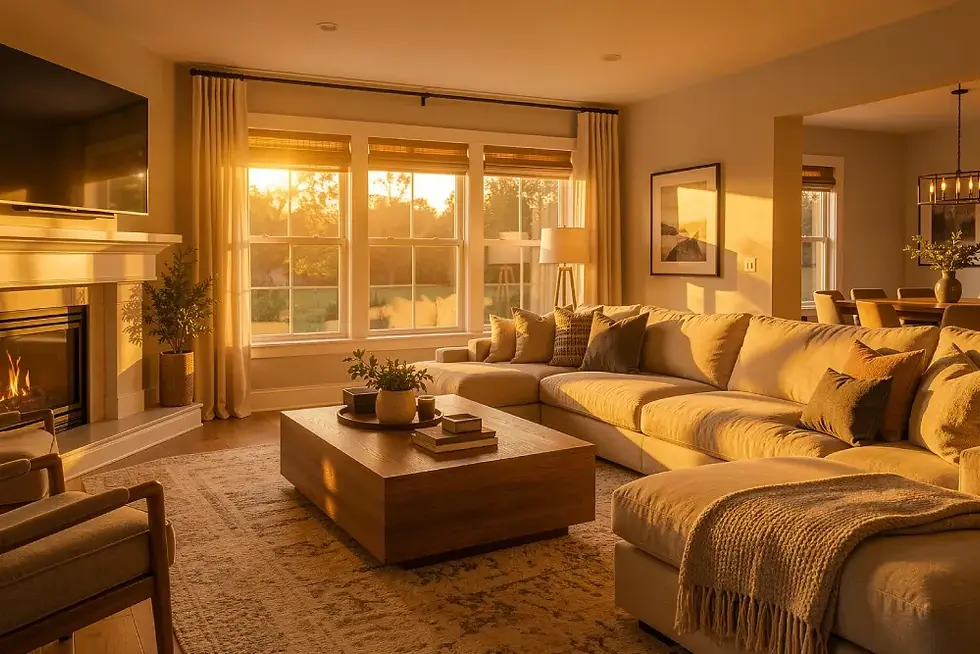
Golden hour lighting is the warm, low-angle sunlight that occurs when the sun sits within roughly 6 degrees above the horizon. Photographers name the same window "magic hour", and both terms describe one sun position. The color temperature of golden hour light measures approximately 3,000-3,500 K, which paints façades in warm amber tones. Long soft shadows stretch across the ground plane, materials gain warmth, and the sky grades into amber. A render relit into golden hour gains the full effect from one description. The AI relight moves the sun without touching the model. Cooler and dimmer twilight follows the golden window, which brings the second condition: dusk.
Dusk lighting
Dusk lighting is the twilight condition after sunset in which ambient sky light and artificial interior light balance each other. Astronomy names the window civil twilight, the period in which the sun sits 0-6 degrees below the horizon. Warm glowing windows against a deep blue sky define the signature architectural dusk shot, and the same balance explains why dusk conversion stands as a standard deliverable in real estate photography. Interior light glows, sky light deepens, and the two balance on site for only a few minutes. AI relighting freezes the balance at its best point and relights any daytime image into that window. Full darkness removes the balance entirely and hands the scene to the next condition: night.
Night lighting
Night lighting is the condition in which artificial light sources carry the entire scene. Interior glow, façade fixtures, and street lamps replace the sun, and reflections multiply on glass and water. The live change-sky demo shows the effect on a circular glass office building at night, where "the interior lights glow warmly through the glass façade". A night render becomes a day render in the documented direction: the change-lighting demo converts a nighttime Japanese apartment to daylight (verified capability, live site, Aug 2026). The reverse, day to night, runs as a prompt-directed relight: describe the artificial lighting, the interior glow, and the reflections, then generate. One condition remains, the shadowless end of the scale: overcast.
Overcast lighting
Overcast lighting is diffuse, shadow-soft daylight produced by full cloud cover. The color temperature of overcast daylight measures approximately 6,500-7,500 K, noticeably cooler than the golden hour range. Overcast light reveals material and façade detail evenly, which suits material studies and documentation sets: a façade relit into overcast conditions shows every texture without shadow interference. ArchiGPT relights the same source image into any of the four conditions, and each relit version preserves the design while the relighting changes only the light. Lighting never changes alone: sky and background move with the sun, which the next section groups.
What Can Be Changed Along with the Lighting?
Sky, background, reflections, shadows, and overall atmosphere can be changed along with the lighting in an AI relighting edit. A golden-hour façade under a midday sky reads as fake, so sky and background must follow the light, which is why sky replacement and background change operate as sub-capabilities of relighting. The scene elements that change along with the lighting are listed below:
-
Sky: replaced to match the new sun position and time of day.
-
Background: surroundings swapped and relit to sit inside the new condition.
-
Reflections: rebuilt on glass and water to mirror the new sky.
-
Shadows: recast in the direction and softness of the new light source.
-
Atmosphere: haze, mood, and color grading aligned with the described condition.
The two heaviest elements, sky and background, receive their own instructions below.
How do you change the sky in a render?
To change the sky in a render, you describe the target sky and the AI rebuilds lighting, reflections, and color balance to match. The live demo documents the full chain: a dark night sky is replaced with "a clear blue one", the tool adjusts "lighting to daylight tones", creates "natural reflections on the glass façade", and maintains "the overall composition, including the people, riverside path, and trees". Clear blue, sunset gradient, dramatic clouds, and night sky are representative sky descriptions a user writes into the prompt. The relight follows the written description rather than a fixed preset menu. The surroundings behind the building change through the same describe-and-generate logic.
How do you change the background of a render?
To change the background of a render, you name the new setting and the AI replaces the surroundings while keeping the building untouched. The live demo swaps a suburban villa backdrop for "a modern metropolitan skyline filled with tall glass skyscrapers", while "atmospheric perspective and realistic reflections integrate the new background seamlessly". Background change edits an existing exterior image. Generating a complete exterior scene from scratch belongs to exterior rendering, a separate generation workflow on the site. The exterior rendering page covers that generation path. Speed separates the AI edit from older relighting methods, and the comparison below measures the difference.
How Does AI Relighting Compare with Other Relighting Methods?
AI relighting produces a relit image in seconds, while re-rendering and manual photo editing take minutes to hours per image. We compare the relighting methods on time, tooling, and output character. The relighting methods are compared below:
Method | Time per Image | Tools Required | Output Character |
|---|---|---|---|
Re-rendering in 3D software | 30 minutes to several hours (typical estimate) | V-Ray, Lumion, or D5 with the original scene file, a software license, and GPU time | Physically recalculated scene; sun and artificial lights move at full render cost |
Manual photo editing | 30-90 minutes (typical estimate) | Photoshop or Luminar plus retouching skill | Hand-blended dodge and burn, with the sky replaced by hand |
Dedicated AI relight tools | Seconds to minutes | Evoto AI Relight, Clipdrop Relight, Krea AI Lighting Editor, Magnific Relight, Beeble AI | Preset-driven relights, strong on portraits and product photos; Beeble and After Effects plugins are video-first VFX tools |
ArchiGPT relighting | Under 60 seconds | A browser: no plugin, no GPU, no installation | Prompt-described lighting that preserves architectural geometry and materials |
Time values for re-rendering and manual editing are conservative estimates rather than measured benchmarks. Evoto, Clipdrop, Krea, and Magnific perform strongly on portraits and product photography, where preset libraries accelerate single-purpose edits, while Beeble AI and the After Effects relight plugins serve video-first VFX pipelines. ArchiGPT concentrates on the architectural case: prompt-described lighting, generation in under 60 seconds, and preserved geometry and materials in the relit render. The use cases that follow show where the relight pays off in practice.
What Are the Use Cases of AI Relighting in Architecture?
Client presentations, real estate listings, design reviews, and marketing visuals are the main use cases of AI relighting in architecture. Portfolio work joins the set as a fifth scenario. The use cases of AI relighting are listed below:
-
Client presentations: one design relit at golden hour, dusk, and night, presented without producing three separate renders.
-
Real estate listings: dark interior photos brightened and exterior shots dusk-converted; a relit, furnished listing photo combines relighting with virtual staging, and the virtual staging tool furnishes the empty rooms in the same browser.
-
Design reviews: mood and time-of-day options relit in seconds before render hours are committed.
-
Marketing and social media: season- and mood-matched relights of one visual for every channel.
-
Portfolio consistency: mixed-source images relit into a single lighting language across the portfolio.
Three of the five scenarios exist as worked examples on our live demo pages, which the next section walks through.
What Are AI Relighting Examples?
AI relighting examples include a nighttime apartment converted to daylight, a night office tower relit under a clear blue sky, and a suburban villa placed against a metropolitan skyline. Each example pairs input state, instruction, and output state, with before/after images inherited from the live demo pages.
-
Nighttime Japanese apartment to daylight: the input shows a night interior lit by city lights; the instruction asks for a sunny morning with the furnishing unchanged; the output is a daytime scene with "warm natural sunlight streaming through the lace curtains", furniture and décor untouched.
-
Night office tower to daytime sky: the input shows the circular glass office building at night; the instruction requests a clear blue daytime sky; the output relights the tower under daylight with matching reflections across the glass façade.
-
Suburban villa to metropolitan skyline: the input shows a villa in suburban surroundings; the instruction names a city setting; the output places the house against "a modern metropolitan skyline filled with tall glass skyscrapers" with matched atmospheric perspective.
Each edit took one written instruction and seconds of generation time, the pattern shared across the AI render tools on the site. Relighting is one of the AI render tools for editing and presenting architectural designs. Time and cost complete the relighting picture.
ArchiGPT · Before / After


How Long Does AI Relighting Take and What Does It Cost?
AI relighting takes seconds per image, with a single relit render generated in under 60 seconds in the browser. A relit image at that speed replaces a re-render cycle measured in hours, which changes the economics of presenting one design in several lighting conditions. Paid plans start at $19 per month for 100 images, the entry price shown on the live pricing page. Two short yes/no questions close the relighting scope, beginning with defective lighting in photographs.
Can AI Fix Bad Lighting in a Photo?
Yes, AI can fix bad lighting in a photo by reconstructing the scene under a described lighting condition. Dark, flat, and uneven lighting are the three defect classes a relight corrects, and even bad quality pictures gain a usable exposure from a described relight. The fix is a relight rather than a brightness slider: shadows and reflections are rebuilt, not amplified. Reconstruction on that scale raises the design-preservation question below.
Does AI Relighting Change the Design Itself?
No, AI relighting preserves the design and changes only light, shadow, and atmosphere. The live demo instruction states the operating principle directly: "Keep all the furniture and decorative elements the same, but adjust the lighting and atmosphere…". Geometry, materials, and furnishing stay fixed, while sky, background, and reflections follow the light. Related editing tools on the platform apply the same preservation principle to other parts of a render.
/
Basic
Perfect for personal and casual use cases.
$19
/month
billed monthly
100 images
Commercial use
Variation
Render history
Upscale
Pro
Most popular
Designed for creators ready to level up.
$39
/month
billed monthly
250 images
Commercial use
Variation
Render history
Upscale
Premium
Ideal for professionals and power users.
$79
/month
billed monthly
500 images
Commercial use
Variation
Render history
Upscale
Ultra
Built for teams, studios, and high-volume creators
$149
/month
billed monthly
1000 images
Commercial use
Variation
Render history
Upscale
Basic
Perfect for personal and casual use cases.
$10
/month
billed yearly $120
6 months free
100 images
Commercial use
Variation
Render history
Upscale
Pro
Most popular
Designed for creators ready to level up.
$20
/month
billed yearly $240
6 months free
250 images
Commercial use
Variation
Render history
Upscale
Premium
Ideal for professionals and power users.
$40
/month
billed yearly $480
6 months free
500 images
Commercial use
Variation
Render history
Upscale
Ultra
Built for teams, studios, and high-volume creators
$75
/month
billed yearly $900
6 months free
1000 images
Commercial use
Variation
Render history
Upscale
One time payment
One-time
$49
billed one time - NO subscription
250 images
Commercial use
Variation
Render history
Upscale
Expires in 30 days
Explore more AI editing tools
add, replace, and arrange furniture in any interior
edit furniture, materials, colors, and decor in existing rooms
furnish empty rooms and generate complete interior design concepts
AI Exterior Design Editor
edit façades, materials, landscaping, and exterior design details
What is the difference between AI relighting and re-rendering?
AI relighting edits the light in a finished image, while re-rendering recalculates the whole scene from the 3D model. Re-rendering requires the original scene file, licensed software, and GPU time measured in minutes to hours per pass, whereas the relight requires one exported image and under 60 seconds in the browser.
Is sky replacement the same as relighting?
Sky replacement is one part of relighting. A swapped sky without matched lighting and reflections looks pasted, which is why both operations run together: the relight rebuilds the light, the reflections, and the color balance around the new sky in a single pass.
Can a day render be turned into a night render?
Yes, a day render can be turned into a night render. Night-to-day is the documented demo case on the live site (Aug 2026), and the reverse direction runs as a prompt-directed relight in which artificial lighting, interior glow, and window reflections are described and generated.
Can AI relight real estate photos?
Yes, AI can relight real estate photos. Dark interiors are brightened and exteriors are dusk-converted from a phone photo, without a 3D model and without a second visit from the photographer.
Does the render engine matter for relighting?
No, the render engine does not matter. Relighting works on the exported image, so V-Ray, Lumion, Enscape, D5 outputs, and photographs are treated identically once uploaded.
Can AI relight a video?
Yes, AI relights video with video-first VFX tools such as Beeble AI and After Effects relight plugins, while ArchiGPT relights still images and renders. Still renders and photographs of architecture remain the scope of the relight described on the current page.