/
Basic
Perfect for personal and casual use cases.
$19
/month
billed monthly
100 images
Commercial use
Variation
Render history
Upscale
Pro
Most popular
Designed for creators ready to level up.
$39
/month
billed monthly
250 images
Commercial use
Variation
Render history
Upscale
Premium
Ideal for professionals and power users.
$79
/month
billed monthly
500 images
Commercial use
Variation
Render history
Upscale
Ultra
Built for teams, studios, and high-volume creators
$149
/month
billed monthly
1000 images
Commercial use
Variation
Render history
Upscale
Basic
Perfect for personal and casual use cases.
$10
/month
billed yearly $120
6 months free
100 images
Commercial use
Variation
Render history
Upscale
Pro
Most popular
Designed for creators ready to level up.
$20
/month
billed yearly $240
6 months free
250 images
Commercial use
Variation
Render history
Upscale
Premium
Ideal for professionals and power users.
$40
/month
billed yearly $480
6 months free
500 images
Commercial use
Variation
Render history
Upscale
Ultra
Built for teams, studios, and high-volume creators
$75
/month
billed yearly $900
6 months free
1000 images
Commercial use
Variation
Render history
Upscale
One time payment
One-time
$49
/month
billed one time - NO subscription
250 images
Commercial use
Variation
Render history
Upscale
Expires in 30 days
How long does an AI room generator take to create a design?
An AI room generator takes under 60 seconds to create a design in ArchiGPT. Regenerating produces further variants of the same room, and the Reuse option applies a previous design to a new generation without rebuilding the prompt.
Can you upload a photo of your own room and redesign it with AI?
Yes, you can upload a JPG or PNG photo of your own room and redesign the space with the AI room generator in a selected style. Empty rooms and furnished rooms both qualify as input, and the room's geometry stays recognizable while the furnishing, colors, and style change.
Can AI furnish an empty room for a real estate listing?
Yes, AI can furnish an empty room for a real estate listing, and buyers see a livable, furnished version of the vacant space. Virtually staged listing photos are disclosed in the listing, and the edits never misrepresent the property's physical condition.
Is there a free AI room generator?
A free AI room generator is not listed on the ArchiGPT pricing page; every room generation runs on a paid plan starting at $19 per month for 100 images. Several competing tools advertise free versions, and the one-time ArchiGPT pack of 250 images costs $49 and expires in 30 days.
Does an AI room generator require software installation?
No, ArchiGPT runs in the browser without plugins, GPUs, or installed software. Uploading the room photo, generating the design, and refining the render all happen in one browser tab.
AI Room Generator FAQs
AI Room Design Generator
An AI room design generator, or AI room generator, is a browser-based tool that turns a photo of an empty or furnished room into a photorealistic, furnished room design in seconds. Interior designers, real estate professionals, and homeowners receive furnished concepts without furniture purchases or designer fees.
We upload a photo, select a room type and interior style, describe the furnishing, and generate in the browser. Furnishing an empty room starts with a vacant-room photo and a prompt. Inputs cover photos, sketches, and 3D screenshots; styles span Scandinavian to traditional.
Photorealism depends on a sharp, well-lit input photo. Alternatives include RoomGPT, Interior AI, and Planner 5D; one generation finishes in under 60 seconds. ArchiGPT is a browser-based AI render tool that furnishes, restyles, and refines rooms without plugins or GPUs.
Instant design alternatives
No GPU needed
Photorealistic results


EMPTY ROOM
RENDER
What Is an AI Room Design Generator?
An AI room design generator is a tool that creates furnished, photorealistic room designs from a room photo, a text prompt, or both. The generator belongs to the class of image-to-image generative AI for interior spaces. Outputs include furnished room concepts of empty rooms and restyled versions of furnished rooms, and the restyled output is named a room makeover. A generic AI image generator invents a new scene from every prompt, while an AI room design generator keeps the photographed room's geometry recognizable in the generated picture.
Generating a room concept is the design step of an interior project. Producing a presentation-grade image of an already-designed space is interior rendering, the separate discipline of turning finished designs into photorealistic visuals. The four-step process below shows how a room design is generated with AI.
How Do You Generate a Room Design with AI?
You generate a room design with AI by uploading a room photo, selecting a room type and an interior style, describing the desired furnishing, and generating the render in your browser. The AI room design generator requires no software installation, no plugin, and no GPU: every step runs in the browser. Generation runs inside the ArchiGPT AI render generator, the engine that converts uploaded JPG and PNG images into photorealistic renders in seconds. We describe the desired furnishing in plain language, and the text prompt steers the furniture, colors, and mood of the generated design. Uploads, prompts, and renders stay inside one AI render generator session from the first photo to the final refined design.
The steps to generate a room design with AI are listed below:
1. Upload the room photo.
A sharp, well-lit JPG or PNG of the empty or furnished room forms the base of the generation, and the photo uploads directly in the browser.
2. Select the room type and interior style.
Room-type selection tells the generator which furniture belongs in the space, and the interior style sets the materials and palette of the design.
3. Describe the furnishing in a text prompt.
A working prompt opens with the following excerpt: "Transform the empty bright room into a lively and colorful children's bedroom. Paint the walls in cheerful teal and orange tones, and add colorful rugs in red, yellow, and blue."
4. Generate and refine the render.
The generator produces the furnished room design in seconds, regeneration creates fresh variants, and the Reuse option applies a previous design to a new generation.
An empty room is the most common starting point for these four steps, and furnishing that empty room with AI is the workflow the next section explains.
How Do You Furnish an Empty Room with AI?
You furnish an empty room with AI by uploading a photo of the vacant space and describing the furniture, colors, and mood the room needs. The AI room design generator adds furniture, rugs, decor, and wall colors, while the walls, windows, and floors of the photographed room stay recognizable. ArchiGPT's live children's-room demo grounds the claim: the vacant room keeps the original window placement and wooden floor while beds, rugs, and shelves appear in the furnished render.
Three groups run the empty-room furnishing workflow. Real estate agents furnish photos of vacant listings so the rooms read as livable spaces. Homeowners moving into a new home preview furniture in the empty rooms before a single purchase. Interior designers build first furnishing concepts from early site photos, then refine the strongest concept.
Furnishing a whole empty room differs from AI furniture placement, the single-object workflow that inserts one specific furniture piece into an existing image. The AI furniture placement page owns that task. Whole-room furnishing generates every element at once, from furniture to wall color. The children's-room example below shows the complete furnishing result on a real empty room.
Rendering a Revit model with AI begins with an exported view and ends with a generated image, so the method runs outside Revit rather than inside an AI render plugin for Revit. ArchiGPT starts after modelling, stops before presenting and uploads no RVT file.
The four steps of the ArchiGPT Revit to render workflow are given below:
ArchiGPT furnished an empty room with white walls and wooden floors into a children's bedroom with teal and orange walls, colorful rugs, a wooden bed with floral bedding, and a bookshelf from one text prompt. The prompt excerpt quoted in step 3 above produced the result. The input photo showed a bright, vacant room; the generated render keeps the window placement and the wooden floor while every furnishing element is new. The before-and-after pair demonstrates how the AI room design generator preserves the room and replaces only the emptiness. An empty room photo is one of several input types the generator accepts.


Before
After
After
Furnishing an empty children's room with AI
Which Inputs Does an AI Room Design Generator Accept?
An AI room design generator accepts empty room photos, furnished room photos, interior sketches, and screenshots of 3D models as JPG or PNG files. The generator creates the room design directly from a photo, without a 3D model or measured drawings as a prerequisite. Any clear image of the space works as a base, and a phone picture of the room qualifies as valid input.
Every accepted input feeds a room-type selection, and the room types the generator supports are defined next.
Empty room photos
The primary input for furnishing a vacant space with a generated design
Furnished room photos
The input for restyling an existing room into a new interior style

Interior sketches
Hand-drawn or digital line drawings that the generator turns into furnished room designs

3D model screenshots
Captures from modeling software such as SketchUp, rendered into photorealistic room concepts
Which Room Types Can Be Generated with AI?
Room types generated with AI include living rooms, bedrooms, kitchens, bathrooms, home offices, children's rooms, dorm rooms, and gaming rooms. Room type matters because the AI room design generator selects context-appropriate furniture per room type.
The room types generated with AI are listed below:
Living room: seating layout dominates the furnishing decisions.
Bedroom: storage and rest define the design, from wardrobe placement to bed orientation.
Kitchen: worktops and cabinetry drive the generated layout.
Bathroom: fixtures and tiling lead the furnishing choices.
Home office: desk ergonomics shape the generated design.
Children's room: safety and playful color guide the furnishing, as the worked example above demonstrates.
Dorm room: compact, multi-use furniture fits the shared-housing footprint.
Gaming room: a desk-and-display setup with ambient lighting anchors the design.
Each room type combines with an interior style, and the applied style determines the look of the generated room.
Which Interior Styles Can Be Applied to a Generated Room?
Interior styles applied to a generated room include Scandinavian, Japandi, minimalist, industrial, mid-century modern, bohemian, and traditional. The style choice governs every furnishing element at once: the AI room design generator keeps a generated room styled consistently across furniture, textiles, materials, and palette, and styling stays coherent between regenerated variants.

Scandinavian
light woods, white walls, and soft neutral textiles

Japandi
low furniture, natural materials, and muted earth tones blending Japanese and Scandinavian design
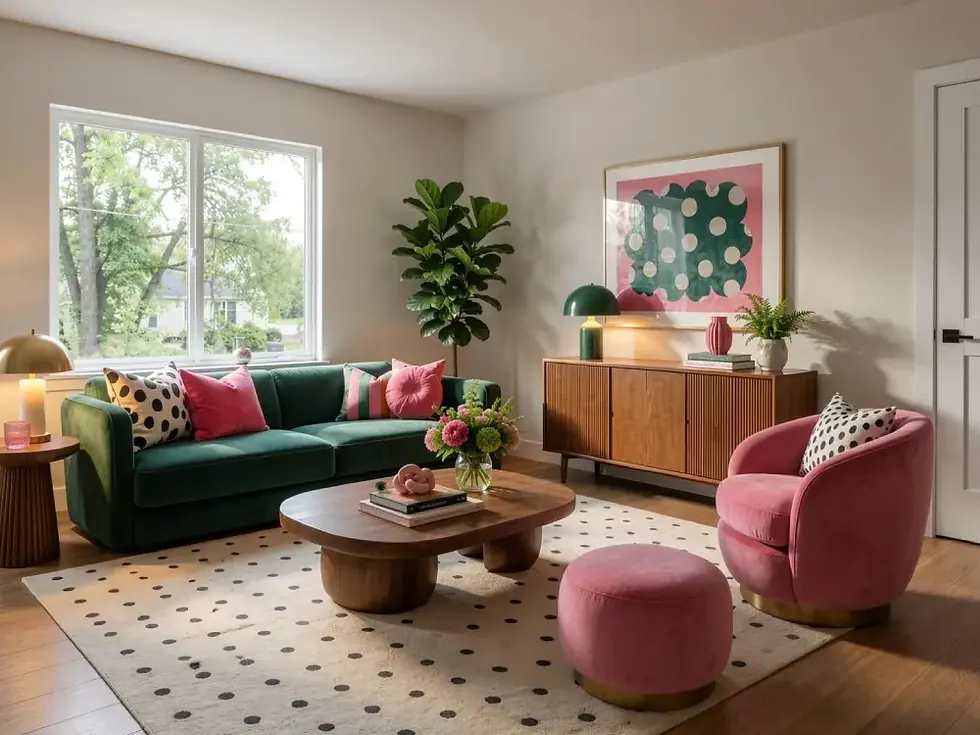
Dopamin
bold, vivid pops of color with playful patterns like polka dots and stripes.

Industrial
exposed brick, raw metal, and dark leather accents
Other interior styles applied to a generated room are listed below:
-
Mid-century modern: teak furniture, organic curves, and warm walnut-and-mustard tones.
-
Minimalist: reduced furnishing, clean lines, and a monochrome palette
-
Bohemian: layered rugs, rattan, plants, and saturated color.
-
Traditional: classic wood furniture, symmetry, and rich fabric upholstery.
A selected style sets the expectation for the final render, and realism decides whether the styled room meets that expectation.
How Realistic Are AI-Generated Room Designs?
AI-generated room designs reach photorealistic quality when the input photo is sharp, well lit, and shows the room's full geometry. Strengths concentrate in materials, lighting, and furniture scale: wood grain, fabric texture, and daylight render convincingly in the generated room. Limits appear in four areas: dimensional accuracy drops in complex layouts, furniture proportions drift in some generations, highly specific custom pieces rarely match the prompt exactly, and text or signage renders as nonsensical characters. Each artifact is fixable by regenerating a variant in the AI room design generator. Producing presentation-grade photorealistic images of an already-designed interior is interior rendering, a separate service from room concept generation. Realism differs per tool, and the comparison below shows how the available generators differ.
Which AI Room Generator Tools Are Available?
AI room generator tools include ArchiGPT, RoomGPT, Interior AI, REimagineHome, Collov AI, and Planner 5D. The best AI room design generator for a given workflow is measured by five criteria: accepted inputs, empty-room furnishing capability, style breadth, generation speed, and entry price. The comparison table below evidences each criterion per tool. ArchiGPT belongs to a wider suite of AI render tools that generate and edit architectural visuals, and the AI render tools hub lists the full suite.
Tool | Inputs | Furnishes empty rooms | Style library | Starting price |
|---|---|---|---|---|
ArchiGPT | Empty or furnished room photos, interior sketches, 3D-model screenshots (JPG, PNG) | Yes: browser-based, renders in under 60 seconds | Curated interior styles from Scandinavian to traditional | $19/month for 100 images ($10/month billed yearly) |
RoomGPT | Room photo | Yes: theme-based room redesign | Preset theme list | Pay-per-image credit packs; no free trial |
Interior AI (mnml.ai) | Room photo | Yes: staging-oriented redesign mode | Preset style list | $29/month Pro; free tier available |
REimagineHome | Room photo | Yes: AI staging focus | Preset style list | From $14/month for 30 credits |
Collov AI | Room photo | Yes: furniture replacement focus | Preset style list | From $19/month for 60 credits |
Planner 5D | Floor plan and 3D scene editor | Manual furnishing from a catalog | Catalog-driven | Free plan; Premium from $19.99/month |
A generated room is not the end of the workflow, since every generated design accepts further changes.
What Can Be Changed in an AI-Generated Room?
Wall colors, furniture styles, textures, materials, lighting, and decor can be changed in an AI-generated room. Concrete changes include teal wall paint on a single wall, a Japandi furniture set, an oak flooring texture, warm evening light in place of daylight, and framed art and plants added as room decor. Paint colors adjust through short follow-up prompts rather than a new upload. The AI room design generator also produces a new furniture layout for the room when the prompt requests one. Generation starts the workflow, and refinement continues in a dedicated editor: an AI room editor is the tool that changes materials and furniture styles inside an existing render, and the AI room editor page covers that editing depth. Generation plus refinement together serve three professional use cases.
What Are the Use Cases of an AI Room Generator?
The use cases of an AI room generator cover interior design concept development, real estate listing preparation, and home renovation planning.
Interior design concept development
Interior designers use an AI room generator to produce furnished concept options before detailed design work begins. Several style variants of the same room generate in seconds, so a designer presents room ideas across Scandinavian, Japandi, and minimalist directions in one meeting. A generated room mockup aligns the client on the furnishing direction before 3D modeling starts, and early alignment protects the design budget from late-stage direction changes. Listing preparation extends the same furnishing workflow to real estate.
Real estate listing preparation
Real estate agents furnish photos of vacant listings with an AI room generator to show buyers a livable space. A furnished render helps buyers read an empty room's scale and purpose from the listing photos. The workflow is a form of AI virtual staging, and one disclosure rule governs the workflow: virtually staged photos are disclosed in the listing, and edits never misrepresent the property's physical condition. Full staging depth, from listing workflow to disclosure practice, lives on the AI virtual staging page, while renovation planning brings the generator into the homeowner's own rooms.
Home renovation planning
Homeowners test furniture layouts, wall colors, and interior styles in a generated room before spending money on a renovation. The AI room generator turns a photo of the current room into a furnished preview of the planned result, which exposes style mismatches before a contractor is hired. Generating several style candidates of one room narrows the renovation brief to a single direction, and homeowners visualize a dream room before committing a budget. Testing costs seconds, not budgets, and the exact generation time and pricing follow below.
Which Other AI Render Tools Edit a Render?
ArchiGPT provides further AI render tools that edit a generated render. The FAQ below answers the remaining short questions about the AI room design generator.
AI Furniture Placement — place a single furniture piece into a render.
AI Room Editor — change materials and furniture styles in a render.
AI Exterior Design Editor — change materials and style on an existing building.
AI Cleanup — remove furniture and objects from a photo.
How Long Does AI Room Generation Take and What Does It Cost?
A single room generation finishes in under 60 seconds in ArchiGPT. Regenerating a variant repeats the same under-60-second cycle, so a full set of style candidates completes within minutes. Plans start at $19 per month for 100 images, and the monthly price drops to $10 per month when billed yearly; a one-time pack of 250 images costs $49 and expires in 30 days. Exact plan details and current numbers live on the pricing page. The live pricing page lists no free tier, so the room generator runs on paid plans. Cost answers the commercial question, and one technical question remains: whether the AI room generator keeps the original room layout.
Can an AI Room Generator Keep the Original Room Layout?
Yes, an AI room generator can keep the original walls, windows, and room proportions while changing the furnishing. The children's-room example above retains the window placement and the wooden floor while furniture, rugs, and wall colors are added. Preservation partly depends on the prompt: the live demo prompt explicitly instructs "Keep the large windows and bright daylight", so the safest workflow states the elements to preserve inside the prompt. Keeping the existing layout differs from generating a new furniture layout, which the changeables section above covers. Layout control is one editing concern among several, and dedicated sibling tools handle the rest of the render-editing work.