Updated on: 20 May 2026
Previous post
Add paragraph text. Click “Edit Text” to update the font, size and more. To change and reuse text themes, go to Site Styles.
Next post
Add paragraph text. Click “Edit Text” to update the font, size and more. To change and reuse text themes, go to Site Styles.
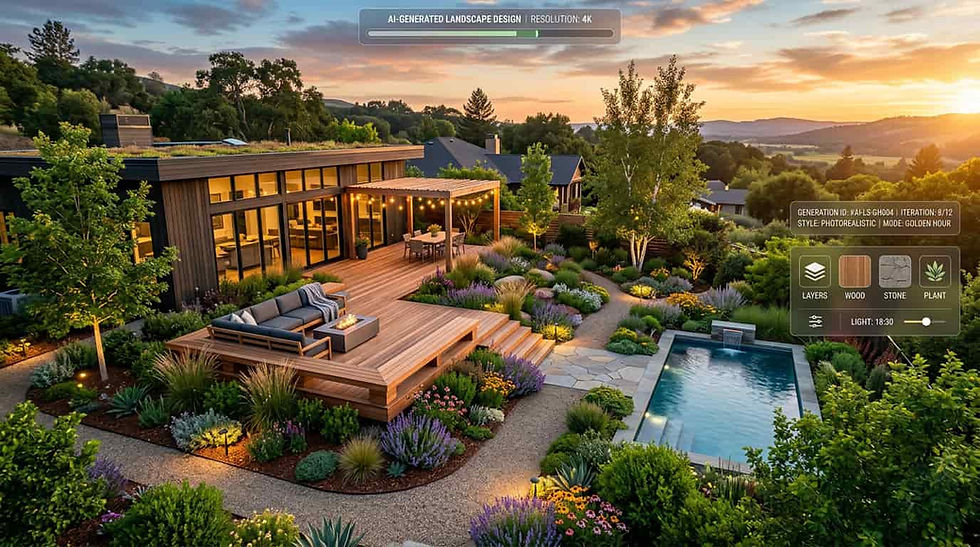
Imagine turning a bare lot photograph into a lush, photorealistic garden concept before your client finishes their morning coffee. That scenario is now routine for professionals who rely on an AI landscape design generator to compress weeks of rendering work into seconds. Whether you design residential courtyards, urban green corridors, or commercial campus exteriors, these tools are reshaping how outdoor spaces move from idea to presentation.
This guide walks you through the underlying technology, compares the leading generators available in 2026, provides a hands-on workflow walkthrough, and explores dedicated use cases for architects and real estate agencies - along with honest limitations and pricing breakdowns.
What Is an AI Landscape Design Generator?
An AI landscape design generator is a software tool that uses artificial intelligence to produce professional outdoor design renderings from site photos, sketches, or text prompts. Users upload an image of a yard, lot, or streetscape, select a style, and the AI delivers photorealistic landscape concepts within seconds - bypassing the manual modelling and rendering pipeline that traditionally takes hours or days.
These generators combine computer vision, generative AI models, and curated plant and material libraries to interpret existing site conditions and propose context-aware design options. The result is a visual asset ready for client presentations, listing enhancements, or internal design reviews.
How AI Landscape Generators Differ from Traditional Design Software?
Traditional landscape architecture software like AutoCAD, SketchUp, or Lumion requires manual scene construction. You model terrain, place individual plant assets, configure lighting, and render - often over several hours per view. An AI landscape design generator bypasses most of those steps by inferring scene geometry, materials, and planting from a single photograph or sketch input.
Speed - concept-level renders produced in seconds rather than hours
Input flexibility - accepts photos, CAD exports, hand sketches, or text prompts
Lower technical barrier - no dedicated 3D modelling expertise required to generate a visual
Iterative output - generate dozens of style variants for rapid comparison
This does not make traditional tools obsolete. Construction-documentation workflows still depend on dimensionally precise CAD and BIM models. AI landscape design generators occupy the early-stage visualization niche where speed and variety matter more than millimeter accuracy.
Who Uses AI Landscape Design Generators in 2026?
Adoption has expanded well beyond hobbyist gardeners. The primary professional audiences include licensed architects exploring site context, interior designers extending projects into outdoor living areas, urban planners visualizing green infrastructure concepts, and real estate agencies staging outdoor spaces for property listings.
Each group values different capabilities. Architects need CAD integration and high-resolution exports. Agencies prioritize batch processing and fast turnaround across dozens of properties.
Understanding your workflow requirements is the first step toward choosing the right AI landscape design generator for your practice. Tools that also handle tasks like coloring site plans within the same platform reduce context-switching even further.

How AI Landscape Design Generators Work?
Behind every photorealistic landscape render is a multi-stage processing pipeline. Understanding these stages helps professionals evaluate output quality, troubleshoot unexpected results, and set realistic expectations for what an AI landscape design generator can and cannot automate.
Image Recognition and Scene Analysis
The pipeline begins with computer vision scene analysis. The model segments the input image into zones - sky, structures, hardscape, softscape, ground plane, and existing vegetation. Depth estimation algorithms approximate terrain contours from a flat 2D photograph, providing the spatial framework for accurate element placement.
This segmentation map tells the generator where it can safely place new elements without violating spatial logic. A fence stays behind a proposed hedge. A patio aligns with the existing grade. Accuracy at this stage directly impacts render believability.
Generative AI Models Behind Photorealistic Landscape Renders
Modern AI landscape design generators rely on diffusion-based generative models - a class of neural networks first described in foundational research on latent diffusion models. These models are trained on large datasets of landscape photographs, architectural renders, and botanical references, learning how sunlight interacts with foliage, how gravel textures appear at different scales, and how shadows anchor objects to a ground plane.
Style transfer algorithms layer aesthetic choices - Japanese garden minimalism, Mediterranean warmth, or contemporary clean lines - on top of the structural layout. The output is a cohesive image rather than a collage of pasted assets, resulting in renders that read as intentional design compositions.
Climate-Aware Plant Suggestions and Terrain Handling
Professional-grade tools go beyond aesthetics. They cross-reference the user's location or specified climate zone with a botanical database - often aligned with the USDA Plant Hardiness Zone Map - to suggest plants that actually thrive in those conditions. This feature separates serious AI landscape design generators from basic style-transfer apps that insert visually appealing but climatically inappropriate species.
Terrain handling is still evolving. Leading generators can detect gentle slopes and adjust planting beds accordingly. Steep grades, retaining walls, and complex drainage remain areas where human landscape architects add irreplaceable value - a limitation the industry openly acknowledges.
Real-Time Rendering vs. Batch Processing
Some generators produce results interactively - you adjust a slider and watch the render update live. Others queue jobs and deliver finished images in batches, which suits agencies processing many properties simultaneously.
Real-time rendering favours one-on-one client sessions where you iterate on the spot. Batch processing favours scale operations like portfolio-wide listing updates. The ideal AI landscape design generator supports both modes depending on context, allowing professionals to switch between collaborative design reviews and high-volume production runs.

Best AI Landscape Design Generators Compared (2026)
Choosing the right AI landscape design generator depends on your role, volume, and integration needs. Below is a transparent comparison of leading tools available to professionals in 2026, based on publicly documented features and pricing at the time of publication.
ArchiGPT - AI Landscape Design for Professionals
ArchiGPT is built specifically for architects, designers, and real estate agencies. It offers direct CAD and BIM integration, batch rendering for multi-property portfolios, high-resolution exports up to 8K, and climate-aware plant libraries. The platform supports photo-to-render, sketch-to-render, and text-to-landscape workflows within a single interface.
Style presets range from contemporary minimalism to tropical resort, with full manual override for hardscape materials, planting density, and lighting conditions. Collaboration features let teams share and annotate renders in real time, streamlining feedback loops during design development.
Gendo.ai - Quick Photo-to-Render Landscape Tool
Gendo.ai focuses on speed and simplicity. Upload a photo and receive a stylized landscape render within seconds. The tool works well for quick concept exploration but lacks deeper CAD integration and professional export options at the time of writing. It appeals to homeowners and designers seeking fast inspiration rather than production-ready deliverables.
Other Notable AI Landscape Design Tools
DreamzAR - mobile-first AR landscape previews for residential clients
Lands Design AI Module - plugin for Rhino and AutoCAD with parametric planting capabilities
iScape - consumer-friendly app with limited professional export formats
Planner 5D AI - broad home design platform with outdoor landscape modules
Feature and Pricing Comparison Table
Note: Pricing and features reflect publicly available information as of early 2026. Verify current plans directly with each vendor before purchasing.

Key Features to Evaluate in an AI Landscape Design Generator
Not every AI landscape design generator suits professional needs. Use the checklist below to evaluate tools against the workflows that matter most to architects, designers, and agencies.
CAD and BIM Integration Capabilities
If your studio runs on Revit, ArchiCAD, or Rhino, the generator should accept DWG or IFC inputs and export renders that map back to your model coordinates. ArchiGPT supports bi-directional sync with major BIM platforms, so a landscape render can reference the exact building footprint from your working model - reducing misalignment between concept visuals and technical documentation.
Output Quality and Resolution for Client Presentations
A 1024px render may look adequate on a phone screen but falls apart on a boardroom projector or printed presentation board. Look for tools that export at 4K or higher with options for PNG, TIFF, and PSD layer separation. This ensures renders integrate cleanly into presentation decks and print materials without visible compression artifacts.
Style Presets and Customization Depth
Presets accelerate output but should never lock you into a single aesthetic. The best AI landscape design generators offer a library of curated styles plus granular sliders for plant density, material finish, time-of-day lighting, and seasonal foliage color.
This level of customization separates professional renders from generic stock imagery. For interiors, a similar approach lets you change the design style of a room with the same degree of creative control.
Export Formats and Workflow Compatibility
PNG and TIFF for lossless print-ready output
PSD with layers for post-production in Photoshop
DWG overlay for reinsertion into CAD documentation
JPEG for quick web and email sharing
MP4 or GIF for animated style-comparison presentations
Mobile and On-Site Access
Site visits happen on foot, not at a desk. A mobile-friendly AI landscape design generator lets you capture a photo on-site and generate a concept before leaving the property. ArchiGPT's mobile interface mirrors the desktop feature set, including style selection, customization sliders, and full-resolution export - making it practical for impromptu client discussions during walkthroughs.

How to Generate Landscape Designs with AI - Step-by-Step Workflow?
The following walkthrough uses ArchiGPT as the primary example. The general sequence applies to most professional AI landscape design generators on the market, though specific interface labels and options vary between tools.
Step 1 - Upload Your Site Photo or Sketch
Open the ArchiGPT dashboard and select "New Landscape Project." Drag in a site photograph, a scanned hand sketch, or a CAD export. The platform accepts JPEG, PNG, TIFF, DWG, and PDF. Higher-resolution inputs produce better scene analysis and more accurate renders because the model has more spatial data to interpret.
Step 2 - Select a Design Style or Theme
Choose from preset themes like Contemporary Courtyard, Mediterranean Terrace, Tropical Resort, or Woodland Retreat. Each preset adjusts plant palettes, material finishes, and lighting profiles. You can also type a custom text prompt for full creative control over the generated landscape direction.
Step 3 - Customize Plants, Materials, and Elements
Refine the AI's initial suggestions. Swap proposed plants for species suited to your climate zone. Adjust hardscape materials - switch concrete pavers to natural stone or composite decking. Add elements like water features, pergolas, or outdoor lighting fixtures to match the client brief. The same texture customization logic powers the ability to change textures on specific elements within architectural renders.
Step 4 - Generate the AI Landscape Render
Click "Generate" and wait a few seconds. ArchiGPT produces multiple variants by default, each with subtle differences in planting arrangement and lighting angle. Review the options and select one or more to refine further or present directly to your client.
Step 5 - Refine, Export, and Share with Clients
Use the built-in refinement tools to adjust color grading, add annotation overlays, or composite the render onto a BIM site plan. Export in your preferred format and share directly via a client review link or download for inclusion in a proposal deck.
Try this workflow yourself. Sign up for ArchiGPT's free trial, upload a site photo, and generate your first professional landscape render in under 60 seconds.

AI Landscape Design Generator Use Cases for Architects
For architects, the value of an AI landscape design generator extends far beyond attractive imagery. It compresses the concept-to-presentation timeline and enables real-time collaboration with clients who find plan drawings difficult to interpret spatially.
Integrating AI Landscape Renders into Architectural Proposals
Competition submissions and client proposals demand compelling visuals. AI-generated landscape renders can illustrate site context, proposed outdoor amenities, and seasonal appearance - all without commissioning a separate visualization studio.
Insert renders alongside floor plans and section drawings for a complete design narrative. You can also add people to renders for human-scale context that makes presentations more relatable to non-technical stakeholders.
Rapid Concept Iteration During Client Reviews
Clients often change direction mid-meeting. With a real-time AI landscape design generator open on screen, you can swap a gravel courtyard for a lawn, replace deciduous trees with evergreens, or shift the palette from warm to cool - all while the client watches. This eliminates the wait-and-return loop that slows traditional revision workflows and keeps design momentum during consultations.
Combining AI Landscape Output with BIM Models
ArchiGPT's DWG and IFC export compatibility means your AI landscape render can align spatially with the building model in Revit or ArchiCAD. Overlay the render as a presentation layer in your BIM environment, or use it as a reference underlay when developing construction documentation for external works.
For building-focused views, the platform also lets you explore different perspectives of a building that complement landscape context.

AI Landscape Visualization for Real Estate Agencies
Real estate professionals face a unique challenge - selling potential, not just existing conditions. An AI landscape design generator transforms neglected yards and empty lots into aspirational outdoor living spaces that help buyers visualize what a property could become with investment.
Virtual Staging for Outdoor Spaces and Vacant Lots
Virtual staging has proven its value indoors, and industry research from the National Association of Realtors confirms that digital tools increasingly influence buyer engagement with listings. AI landscape generators extend the same principle outdoors.
Upload a photo of a barren lot, and the tool renders a fully landscaped environment - complete with mature trees, pathways, and outdoor furnishings. Buyers engage more deeply with listings that show livable potential rather than empty space.
Listing Enhancement with AI-Generated Curb Appeal
Curb appeal drives first impressions. AI-generated front-yard upgrades - new planting beds, refreshed hardscape, strategic lighting - can be added to listing photos in seconds. Always clearly label enhanced images as visualizations or artist impressions to maintain buyer trust and comply with advertising standards in your jurisdiction.
Batch Processing for Multi-Property Portfolios
Agencies managing dozens or hundreds of listings cannot manually render each property. ArchiGPT's batch processing feature lets you queue an entire portfolio of exterior photos and receive styled landscape renders overnight. This scales curb appeal enhancement across your book of listings without adding headcount or outsourcing. Review ArchiGPT pricing plans to find a tier that matches your portfolio volume.
Before and After - AI-Generated Landscape Design Transformations
Visual proof matters more than promises. The following transformation examples demonstrate what a professional AI landscape design generator can produce across residential, commercial, and urban contexts - illustrating both the quality and the boundaries of current AI capabilities.
Residential Backyard Transformations
A bare suburban backyard with patchy grass and a chain-link fence becomes a layered garden with native perennial borders, a timber deck, and ambient string lighting. The AI maintains the existing house facade and fence line while filling the space with contextually appropriate softscape and hardscape elements.
Note that these renders represent visual concepts - plant spacing and structural elements should be verified by a qualified professional before construction.
Commercial Property Exterior Upgrades
An aging office park entrance with overgrown hedges is reimagined with clean geometric planting, a welcoming pedestrian path, and contemporary signage integration. The render preserves building proportions and parking geometry while elevating the streetscape presence for prospective tenants and visitors.
Urban Green Space and Pocket Park Concepts
A vacant urban lot surrounded by mid-rise buildings is transformed into a pocket park with shade trees, seating nodes, and bioswale drainage. The AI respects adjacent building shadows and sight lines, producing a render that urban planners can present to council stakeholders as a visual concept. Engineering feasibility, stormwater calculations, and regulatory compliance still require professional civil and landscape engineering review.
Limitations and Honest Expectations for AI Landscape Generators
No AI tool is infallible. Setting realistic expectations helps professionals use an AI landscape design generator effectively and know when to bring in human expertise for aspects that go beyond visualization.
Terrain, Slope, and Grading Accuracy
Current AI landscape design generators handle gentle slopes reasonably well but struggle with steep terrain, multi-level retaining walls, and complex drainage requirements. If your site involves significant grade changes, use the AI render as a conceptual starting point and develop grading plans in dedicated civil engineering or landscape architecture software with proper survey data.
Regional Plant Suitability and Climate Zones
Climate-aware plant suggestions are improving with each model update, but they are not yet foolproof. Verify suggested species against local hardiness zones, soil conditions, and water availability. ArchiGPT's botanical database references USDA zones and Koppen climate classifications, but microclimate nuances - such as frost pockets, salt exposure, and rain shadows - still require professional horticultural judgment.
When Human Landscape Architects Are Still Essential
AI landscape design generators augment rather than replace human landscape architects. Construction-ready grading plans, stormwater management engineering, structural specifications for retaining walls, and irrigation design all require licensed professionals operating within established standards set by bodies like the American Society of Landscape Architects.
The generator excels at visualization and rapid iteration - not at engineering documentation or regulatory compliance.
AI Landscape Design Generator Pricing and Plans
Cost structures vary significantly between consumer apps and professional AI landscape design generators. The table below summarizes what each tier typically includes based on current market pricing.
Free AI Landscape Design Generators - What You Actually Get
Free tiers exist but impose strict limitations. Expect capped resolution (usually 1024px), watermarked outputs, restricted export formats, and no commercial usage rights. Free plans work for personal experimentation and initial tool evaluation but fall short of professional delivery standards.
Professional Plans for Architects and Agencies
Professional plans unlock high-resolution exports, commercial licensing, batch processing, CAD/BIM integration, and priority rendering queues. Monthly costs typically range from $25 to $60 depending on render volume and feature access, though pricing may vary by vendor and billing cycle.
Enterprise and Team Pricing Options
Larger studios and agencies benefit from enterprise tiers with unlimited or high-volume renders, team collaboration dashboards, SSO authentication, and dedicated support channels. Enterprise pricing is usually custom-quoted based on seat count and expected volume.
Key Takeaways
An AI landscape design generator converts site photos, sketches, or text prompts into photorealistic outdoor renders within seconds - dramatically reducing concept-to-presentation timelines for design professionals.
ArchiGPT differentiates from consumer-focused tools by offering CAD/BIM integration, batch processing, high-resolution exports up to 8K, and features built specifically for architects and real estate agencies.
Climate-aware plant suggestions and terrain analysis are emerging capabilities that separate professional-grade AI landscape design generators from basic style-transfer applications.
Real estate agencies use AI landscape visualization for virtual staging of outdoor spaces, vacant lot marketing, and listing curb appeal enhancement at scale - always labelling outputs as visualizations.
Free AI landscape design generators exist but typically limit resolution, export options, and commercial usage rights - professional plans unlock the features architects and agencies need for client-ready deliverables.
AI landscape design generators augment rather than replace licensed landscape architects - they excel at rapid iteration and visualization but still require professional judgment for construction-ready documentation, engineering, and regulatory compliance.
Frequently Asked Questions
What is the best AI landscape design generator in 2026?
ArchiGPT leads for professional use cases thanks to CAD/BIM integration, 8K exports, batch processing, and climate-aware plant libraries. For quick personal inspiration, Gendo.ai and DreamzAR offer simpler entry points. The best choice depends on whether you need professional delivery quality or casual exploration.
Is there a free AI landscape design generator?
Yes. Several tools including Gendo.ai and Planner 5D offer free tiers. However, free plans typically cap resolution at 1024px, add watermarks, restrict export formats, and prohibit commercial usage. Professionals usually need a paid plan to meet client delivery standards.
Can AI design my backyard from a photo?
Yes. Upload a clear photo of your backyard, select a design style, and the AI landscape design generator produces a fully rendered concept in seconds. For best results, capture the photo during daylight with the full area visible. The AI interprets existing structures, grade, and boundaries automatically.
How accurate are AI landscape design generators?
Visually, top AI landscape design generators produce photorealistic results suitable for presentations and listings. Dimensionally, they approximate spatial relationships but are not measurement-accurate. Always verify plant sizes, setback distances, and grade changes with traditional tools before moving to construction documentation.
Can architects use AI landscape generators for client presentations?
Yes, and many already do. AI landscape renders supplement architectural proposals with compelling outdoor visuals that help clients understand spatial context. High-resolution exports integrate directly into slide decks, printed boards, and BIM presentation views without additional rendering software. You can also generate renders from elevation drawings to complement landscape concepts.
Is AI landscape design suitable for real estate staging?
It is highly effective for virtual staging of outdoor spaces. Agencies use AI landscape renders to show buyers the potential of vacant lots, neglected yards, or unfinished exteriors. Label enhanced images as visualizations to maintain transparency and comply with advertising standards.
Do AI landscape design tools replace landscape architects?
No. AI landscape design generators handle visualization and rapid concept iteration but cannot produce construction-ready grading plans, irrigation specifications, stormwater engineering, or structural documentation. Licensed landscape architects remain essential for any project that moves beyond the concept stage into physical construction.
Can AI handle slope and terrain in landscape design?
Current generators detect and render gentle slopes effectively. Steep terrain, multi-level retaining walls, and complex drainage scenarios still challenge AI models. For sites with significant grade changes, treat AI renders as conceptual visuals and develop engineering solutions in dedicated civil or landscape software.
Do AI landscape tools suggest plants based on climate zone?
Professional tools like ArchiGPT cross-reference your specified location with USDA hardiness zones and Koppen climate classifications. The system recommends species that thrive in local conditions. Always verify suggestions against microclimate factors like shade, wind exposure, and soil type before finalizing planting plans.