Updated on: 08 May 2026
Previous post
Add paragraph text. Click “Edit Text” to update the font, size and more. To change and reuse text themes, go to Site Styles.
Next post
Add paragraph text. Click “Edit Text” to update the font, size and more. To change and reuse text themes, go to Site Styles.
Designing a room used to demand hours of manual rendering, mood board assembly, and costly revisions. Today, an AI interior design generator can transform a simple photo into a photorealistic concept in seconds, giving professionals and homeowners a faster path from idea to visualization. The technology has matured significantly since early generative models emerged, and the tools available in 2026 offer capabilities that would have seemed impractical just a few years ago.
This guide walks you through everything you need to know - from how the underlying AI technology works and which tools lead the market, to step-by-step workflows for architects, interior designers, and real estate agencies looking to save time, reduce costs, and deliver compelling visual concepts to clients.
A modern minimalist living room concept generated in seconds using ArchiGPT's AI interior design generator.
What Is an AI Interior Design Generator?
Core Definition and How It Differs from Traditional Design Software
An AI interior design generator is a software tool that uses artificial intelligence to create photorealistic room designs from uploaded photos or text prompts. Users select design styles, adjust layouts, and generate multiple concepts in seconds without manual 3D rendering or CAD expertise.
Traditional design software like AutoCAD, SketchUp, or 3ds Max requires significant training and hours of hands-on work to produce a single render. An AI-powered generator bypasses most of that manual effort. Instead of building geometry, applying textures, and configuring lighting by hand, the AI handles these steps automatically based on learned patterns from large datasets of design images.
The result is a fundamentally different workflow. Where conventional tools reward deep technical skill, AI interior design generators reward clear creative direction. You describe what you want - through a combination of photo input, style selection, and text prompt - and the system produces it.
Key Capabilities - From Photo Uploads to Photorealistic Renders
Modern AI interior design generators share a core set of capabilities that make them practical for real projects. These include photo-to-render transformation, style selection from curated libraries, text prompt interpretation, and rapid preview generation.
Upload an existing room photo and receive a redesigned version in a chosen style within seconds.
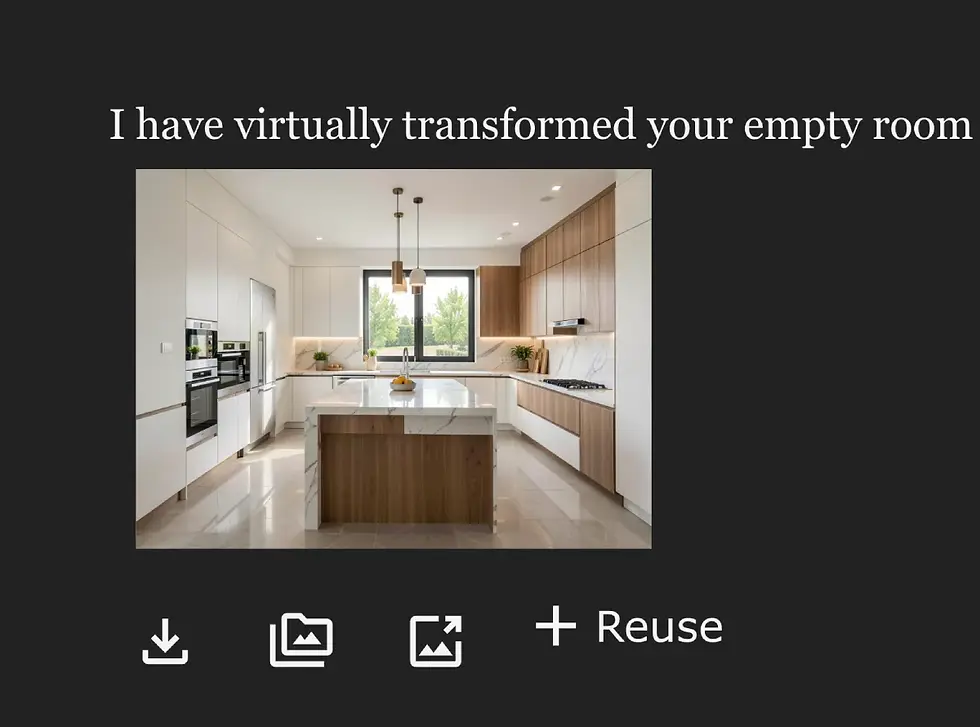
Start from a blank canvas or empty room and generate a fully furnished concept.
Write a detailed text prompt describing materials, furniture, colors, and mood.
Iterate quickly by adjusting style parameters, swapping elements, or refining prompts.
Export high-resolution renders in formats like PNG, JPEG, or PDF for presentations.
Who Uses AI Interior Design Generators and Why Demand Is Growing?
The user base spans a wide spectrum. Homeowners use these tools for quick inspiration before a renovation. Interior designers rely on them for rapid concept iteration during early project phases. Architects incorporate AI renders into client presentations to accelerate approvals.
Real estate agencies represent one of the fastest-growing segments. Virtual staging with AI costs a fraction of physical staging and can be completed in minutes rather than days. Urban professionals exploring apartment layouts before a lease signing also find value in quick visualizations.
Demand is growing because render quality, dimensional awareness, and style variety have all improved substantially over recent model generations, making AI-generated interior designs credible enough for professional and commercial use in many standard scenarios.
How AI Interior Design Generators Work?
Image Recognition and Room Analysis
The process begins when a user uploads a room photo. Computer vision algorithms analyze the image to identify walls, floors, ceilings, windows, doors, and existing furniture. This spatial reasoning step creates a structural map of the room that the AI uses as a foundation for generating new designs.
Advanced tools also estimate room dimensions from perspective cues, detect lighting sources, and classify surface materials. The accuracy of this initial analysis directly affects the realism and spatial correctness of the final output.
Generative AI Models - Diffusion, GANs, and Neural Style Transfer
Once the room is analyzed, generative models take over. The dominant architecture in 2026 is the diffusion model, which works by starting with random noise and progressively refining it into a coherent image guided by the user's prompt and style selection. The foundational research behind this approach was published by Ho et al. in their denoising diffusion probabilistic models paper, which established the mathematical framework most current tools build upon.
Generative adversarial networks (GANs) use a two-part system where one network generates images and another evaluates them for realism. This adversarial loop produces increasingly convincing outputs with each iteration. Neural style transfer adds another layer, allowing the AI to apply the visual characteristics of one design style onto the structural layout of the original room. Many commercial tools combine elements of these approaches to optimize for both quality and speed.
How Prompts and Style Selections Shape the Output
User input acts as the creative steering mechanism. A text prompt like "bright Scandinavian living room with oak flooring and linen sofa" gives the model specific targets for materials, color palette, and furniture style. More detailed prompts consistently produce more accurate and useful results.
Style library selections work as curated preset bundles. When you choose "modern minimalist," the system applies a predefined set of constraints covering color ranges, furniture silhouettes, material preferences, and spatial density. Combining a style selection with a custom prompt gives the most precise control over the AI interior design generator output.
The Role of Training Data in Design Quality and Realism
Every AI interior design generator is only as good as its training data. Models trained on large, diverse datasets of professionally photographed interiors, architectural renders, and design publications produce more realistic and stylistically coherent outputs than those trained on smaller or lower-quality datasets.
This is one reason why professional-grade tools invest heavily in curated training sets. The quality gap between consumer-tier and professional-tier generators often comes down to training data breadth, curation standards, and post-processing pipelines that refine raw model output.

How to Use an AI Interior Design Generator - Step-by-Step Guide
Step 1 - Upload a Room Photo or Start from a Blank Canvas
Begin by uploading a clear photo of the space you want to redesign. The image should be well-lit and capture the full room if possible. Alternatively, some AI interior design generators let you start with an empty canvas or a simple floor plan sketch.
Step 2 - Select Your Design Style and Preferences
Choose from the tool's style library. Options typically include modern minimalist, Scandinavian, industrial, Japandi, mid-century modern, and many more. In ArchiGPT, you can browse over 30 curated design styles with visual previews before committing. For a detailed look at how style changes transform a space, explore the change design style of interior feature.
Step 3 - Write or Refine Your Design Prompt
Add specific instructions using a text prompt. Describe materials, colors, furniture types, mood, or functional requirements. For example: "warm-toned home office with walnut desk, green velvet chair, and built-in shelving."
Step 4 - Generate and Preview AI Design Concepts
Click generate and wait a few seconds. Most AI interior design generators produce results in 5 to 30 seconds depending on the complexity and server load. Review the output in the preview window before deciding on next steps.
Step 5 - Refine, Iterate, and Customize the Results
If the first output is not perfect, adjust your prompt or style settings and regenerate. Iteration is the key to great results. Professional designers often generate 5 to 10 variations before selecting finalists for a client presentation. You can also swap textures on specific elements to fine-tune materials without regenerating the entire scene.
Step 6 - Export High-Resolution Renders and Share
Once satisfied, export the design in your preferred format. Professional workflows typically require high-resolution PNG or TIFF files. ArchiGPT supports multiple export formats including PNG, JPEG, and PDF for easy integration into presentations and proposals.
Pro Tips for Getting the Best Results from Any AI Design Generator
Photograph rooms in natural daylight and avoid harsh shadows or extreme contrast for the cleanest input.
Capture the widest angle possible. Corner-to-corner shots give the AI more spatial data to work with.
Be specific in prompts. "Light oak herringbone floor" outperforms "wooden floor" every time.
Generate multiple variations before settling. The third or fourth iteration is often the strongest.
Use consistent style settings across rooms if you need multi-room coherence for a single project.
Before and After - AI Interior Design Generator Results in Action
The most convincing demonstration of what an AI interior design generator can do is visual evidence. Below are representative before-and-after transformations generated with ArchiGPT across different room types, styles, and use cases.
Living Room Transformation - Modern Minimalist
Room type: Living room.
Style applied: Modern minimalist.
Prompt: "Open-plan living room with low-profile gray sectional, concrete coffee table, floor-to-ceiling windows, and recessed lighting."
Approximate generation time: 12 seconds.
Tool: ArchiGPT.
The original photo showed a cluttered living room with mismatched furniture. The AI-generated concept replaced every element with a cohesive minimalist palette, maintaining the room's proportions and natural light direction.
Kitchen Redesign - Scandinavian Warmth
Room type: Kitchen.
Style applied: Scandinavian.
Prompt: "Bright Scandinavian kitchen with white cabinetry, butcher block counters, open shelving, and pendant lights."
Approximate generation time: 15 seconds.
Tool: ArchiGPT.
The dated original featured dark wood cabinets and fluorescent lighting. The AI output introduced a warm, airy Scandinavian aesthetic while preserving the kitchen's footprint and window placement.
Home Office Makeover - Industrial Meets Functional
Room type: Home office.
Style applied: Industrial.
Prompt: "Industrial home office with exposed brick, metal pipe shelving, leather desk chair, and matte black desk lamp."
Approximate generation time: 10 seconds.
Tool: ArchiGPT.
A bland spare bedroom was reimagined as a focused workspace. The AI interior design generator added industrial character while ensuring the furniture arrangement supported a practical work-from-home setup.
Empty Room to Fully Staged - Virtual Staging for Real Estate
Room type: Empty apartment living space.
Style applied: Contemporary luxury.
Prompt: "Staged luxury apartment with velvet sofa, marble side table, abstract wall art, and warm ambient lighting."
Approximate generation time: 14 seconds.
Tool: ArchiGPT.
Starting from a completely vacant room, the AI produced a fully staged concept suitable for listing photography. This single render replaced what could cost $2,000 or more in traditional physical staging depending on the market. You can also place specific furniture pieces into a room for even more precise staging control.
Commercial Space Concept - Boutique Hotel Lobby
Room type: Commercial lobby.
Style applied: Art Deco and glamour.
Prompt: "Boutique hotel lobby with terrazzo floor, brass accents, curved reception desk, and statement chandelier."
Approximate generation time: 18 seconds.
Tool: ArchiGPT.
This example demonstrates the generator's capability beyond residential spaces. The AI handled a larger, more complex layout and delivered a concept that a hospitality design team could use as a starting point for further development and refinement.

Best AI Interior Design Generators in 2026 - Tools Compared
Comparison Table - Features, Pricing, and Best Use Cases
Choosing the right AI interior design generator depends on your specific needs. The table below compares eight leading tools across the criteria that matter most for professional and personal use. Note that render quality ratings reflect our editorial assessment based on output samples and may vary by use case.
ArchiGPT - Professional-Grade Renders with Workflow Integration
ArchiGPT is built specifically for professionals who need photorealistic quality and seamless workflow integration. With over 30 design styles, batch rendering, collaboration features, and high-resolution exports in multiple formats, it serves architects, interior designers, and real estate agencies from concept through client delivery.
Gendo.ai - Fast Visualizations for Quick Concepts
Gendo.ai focuses on speed and simplicity for architectural visualization. It handles quick concept renders well but offers fewer style options and limited export flexibility compared to professional-tier AI interior design generators. It tends to be best suited for early-stage ideation rather than polished client-facing deliverables.
Interior AI - Consumer-Friendly Room Restyling
Interior AI targets homeowners and DIY decorators with a simple upload-and-restyle workflow. The interface is intuitive, but render quality and style depth may fall short of professional requirements. It works well for personal inspiration and early exploration.
RoomGPT and Other Notable Tools
RoomGPT offers a generous free tier and is popular for casual room redesign. Planner 5D combines AI with traditional floor-plan editing. HomeDesigns AI focuses on renovation visualization, while REimagineHome targets real estate virtual staging. Collov AI provides a budget-friendly entry point with decent style variety.
How to Choose the Right AI Interior Design Generator for Your Needs?
If you need professional-grade renders for client work, choose a tool with high render quality, multiple export formats, and collaboration features. ArchiGPT fits this profile.
If you are a homeowner seeking quick inspiration, a consumer-friendly tool like Interior AI or RoomGPT may be sufficient.
If virtual staging is your primary use case, look for tools with dedicated staging workflows like ArchiGPT or REimagineHome.
If budget is the top concern, start with free tiers and upgrade only when you hit resolution or usage limits.
Key Features to Look for in an AI Interior Design Generator
Photorealism and Render Quality
Render quality is the single most important differentiator when evaluating any AI interior design generator. A design concept that looks artificial undermines credibility in professional settings. Look for tools that produce photorealistic outputs with accurate lighting, shadows, reflections, and material textures.
Style Library Depth and Customization Options
The breadth of available styles determines how versatile the tool is across projects. A robust library of 20 or more styles - from Japandi to Art Deco - lets you quickly present multiple directions to a client. Customization options like color adjustments and material overrides add further control.
Room Dimension Accuracy and Spatial Awareness
Professional work demands dimensional accuracy. The AI should preserve room proportions, correctly size furniture relative to the space, and maintain realistic spatial relationships. Tools with advanced spatial reasoning reduce common errors like oversized sofas in small rooms or floating furniture.
Prompt Flexibility - Text, Sketch, and Photo Inputs
The most capable AI interior design generators accept multiple input types. Text prompts give creative direction. Photo uploads provide spatial context. Some tools also accept hand-drawn sketches or floor plans as starting points, expanding how designers can communicate intent to the AI.
Collaboration, Export, and Integration Features
For team-based workflows, look for collaboration features like shared project spaces, comment threads, and version history. Export options should include high-resolution formats (PNG, TIFF, PDF) suitable for print and presentation. API access matters for firms integrating AI into existing software stacks.
Pricing Models - Free Tiers, Subscriptions, and Enterprise Plans
Pricing ranges widely across tools. Free tiers are useful for testing, but professional work typically requires paid plans that unlock higher resolutions, commercial usage rights, and unlimited or expanded render allowances. Enterprise plans typically add team management, dedicated support, and SLA guarantees. Compare all available subscription plans and pricing to find the right fit for your practice.

AI Interior Design Generator for Architects and Interior Designers
Rapid Concept Iteration - From Brief to Visual in Minutes
The biggest time savings come during the concept phase. Where a designer might spend 2 to 3 hours producing a single hand-rendered or 3D-modeled concept, an AI interior design generator can produce multiple variations in under 5 minutes. This speed transforms how studios approach the early creative process.
Instead of presenting one or two laboriously crafted options, designers can show a full range of directions. Clients tend to respond better when they see multiple possibilities, and the feedback loop accelerates dramatically.
Integrating AI Renders into Client Presentations and Proposals
AI-generated renders integrate directly into client-facing deliverables. High-resolution exports drop into presentation decks, proposal documents, and digital mood boards. For architects using ArchiGPT, the PDF and TIFF export options support this workflow seamlessly.
The visual quality of professional-grade AI renders has improved to the point where many clients find them indistinguishable from traditional 3D renderings in standard viewing contexts.
This makes AI-generated concepts viable for initial pitch meetings, design development reviews, and virtual staging presentations. As noted by the American Society of Interior Designers (ASID), adopting new visualization technologies is increasingly standard practice across the profession.
Using AI for Material Palette and Color Exploration
Beyond full-room concepts, designers use AI generators for color palette generation and material exploration. By adjusting prompts to specify different stone types, wood species, metal finishes, or fabric textures, a designer can quickly visualize how various material combinations work in a specific space. ArchiGPT also lets you apply custom textures to furniture for rapid material comparison on individual pieces.
Workflow Example - How a Design Studio Uses ArchiGPT for Multi-Option Proposals
Consider a mid-size interior design studio receiving a brief for a residential living room renovation. The project timeline is tight, and the client wants to see options within 48 hours.
The lead designer photographs the existing room from three angles using a smartphone.
They upload the best photo to ArchiGPT and select five different styles: modern minimalist, Scandinavian, Japandi, contemporary luxury, and biophilic.
For each style, they write a refined prompt specifying client preferences (warm tones, seating for four, integrated storage).
ArchiGPT generates two variations per style, producing 10 concepts in roughly 8 minutes.
The designer exports the top six renders as high-resolution PNGs and drops them into a presentation deck.
The client reviews the deck, narrows to two styles, and the designer iterates further with refined prompts.
Total time invested: approximately 45 minutes from photo capture to polished proposal. A comparable scope using traditional manual rendering would typically require 15 to 20 hours depending on detail level.
Can AI Replace Interior Designers? Why Professional Expertise Still Matters
The short answer is no. AI interior design generators are powerful creative accelerators, but they lack the contextual understanding, client empathy, and technical knowledge that a trained designer brings. The AI does not know your client's lifestyle, accessibility needs, or budget constraints unless explicitly told - and even then, it cannot exercise judgment the way a professional can.
Professional judgment remains essential for assessing structural feasibility, ensuring code compliance, coordinating with contractors, and making the nuanced decisions that distinguish good design from great design. AI handles the visualization. The designer handles everything else - and that "everything else" is what clients ultimately pay for.
AI Interior Design Generator for Real Estate Virtual Staging
What Is AI Virtual Staging and Why Real Estate Agencies Are Adopting It?
AI virtual staging uses an AI interior design generator to furnish and decorate empty or outdated property photos digitally. The result is a listing image that shows the space as move-in ready, helping buyers visualize potential.
According to research from the National Association of Realtors, digital visualization tools are increasingly central to modern real estate marketing strategies. Agencies are adopting AI staging because it delivers faster turnaround and substantially lower costs compared to traditional methods.
Cost and Time Savings - AI Staging vs. Traditional Physical Staging
Traditional physical staging typically costs $2,000 to $5,000 or more per property depending on market and property size. It involves renting furniture, hiring movers, and coordinating schedules. The process often takes days or weeks.
AI virtual staging costs between $20 and $50 per room on a per-image basis, or is included in a monthly subscription. The process takes minutes. For agencies managing multiple listings simultaneously, the cost reduction can be substantial - often 80% to 95% compared to physical staging, depending on the market and staging requirements.
How to Stage a Listing with an AI Interior Design Generator
Photograph each empty room with consistent lighting and wide-angle framing.
Upload each photo to the AI staging tool and select an appropriate style for the target buyer demographic.
Generate staged versions, review for realism, and regenerate if needed.
Export high-resolution images and add them to the listing alongside the original unstaged photos.
Best Practices for Realistic and Compliant Virtual Staging
Always disclose that listing images are virtually staged. Most real estate advertising standards and many jurisdictions legally require this transparency.
Do not alter structural elements like walls, windows, or ceiling height in staged images.
Keep furniture scale realistic. Oversized pieces in a small room look misleading and may erode buyer trust.
Include both staged and unstaged photos in the listing for full buyer transparency.
Review local regulations regarding virtual staging disclosure requirements before publishing.
ArchiGPT for Real Estate - Dedicated Virtual Staging Features
ArchiGPT includes features tailored for real estate professionals. Batch rendering allows agents to stage multiple rooms from a single listing in one session. Style presets designed for broad buyer appeal help generate universally attractive concepts. High-resolution exports meet the image quality standards of major listing platforms. Agents can also add people to renders to create lifestyle-focused listing images that help buyers envision daily life in the space.

Design Styles You Can Generate with AI - A Visual Gallery
One of the most valuable capabilities of an AI interior design generator is the ability to instantly visualize the same room in multiple styles. Below are ten popular design styles, each with a description, sample prompt, and best-for context.
Modern Minimalist
Clean lines, neutral tones, and open space. Focuses on function and visual simplicity. Sample prompt: "Minimalist living room, white walls, low-profile sofa, concrete floor, single statement plant." Best for: urban apartments, compact spaces.
Scandinavian
Light wood, soft textiles, and airy brightness. Warm yet uncluttered. Sample prompt: "Scandinavian bedroom, birch nightstand, white linen bedding, woven rug, natural light." Best for: family homes, rental properties.
Mid-Century Modern
Organic curves, tapered legs, and retro color palettes. Timeless and design-forward. Sample prompt: "Mid-century modern den, teak credenza, mustard armchair, geometric rug, sunburst clock." Best for: design enthusiasts, creative studios.
Industrial Loft
Exposed brick, metal frames, and raw textures. Urban and utilitarian. Sample prompt: "Industrial loft kitchen, exposed ductwork, stainless steel appliances, pendant Edison bulbs." Best for: loft conversions, co-working spaces.
Japandi
A fusion of Japanese minimalism and Scandinavian warmth. Calm and intentional. Sample prompt: "Japandi dining room, low table, floor cushions, shoji screen divider, bonsai accent." Best for: meditation rooms, serene living spaces.
Art Deco and Glamour
Bold geometric patterns, rich jewel tones, and luxurious materials. Dramatic and opulent. Sample prompt: "Art Deco bathroom, emerald tile, brass fixtures, mirrored vanity, marble floor." Best for: boutique hotels, luxury residences.
Bohemian Eclectic
Layered textiles, global patterns, and curated collections. Expressive and personal. Sample prompt: "Bohemian living room, macrame wall hanging, kilim rug, rattan furniture, hanging plants." Best for: creative professionals, eclectic homes.
Contemporary Luxury
Sleek materials, statement lighting, and refined detailing. Sophisticated and current. Sample prompt: "Luxury master suite, upholstered headboard, marble accent wall, recessed LED cove lighting." Best for: high-end residential, penthouse listings.
Coastal and Mediterranean
Whitewashed surfaces, ocean blues, and natural fibers. Relaxed and airy. Sample prompt: "Coastal dining room, whitewashed table, navy blue chairs, driftwood chandelier, sea glass accents." Best for: vacation rentals, beach properties.
Biophilic and Nature-Inspired
Living walls, natural materials, and abundant greenery. Restorative and grounding. Sample prompt: "Biophilic office, living moss wall, reclaimed wood desk, skylights, potted ferns throughout." Best for: wellness spaces, sustainable offices.
Free vs. Paid AI Interior Design Generators - What You Actually Get?
What Free AI Interior Design Generators Typically Include
Free tiers are useful for testing a tool before committing. They generally provide a limited number of renders per month (often 3 to 5), capped resolution (typically 720p or similar), a reduced style library, and watermarked outputs. These restrictions make free tiers adequate for personal exploration but generally impractical for professional deliverables.
What You Unlock with Paid Plans
Unlimited or significantly expanded monthly render allowances.
High-resolution exports (1080p, 4K, or higher) without watermarks.
Full access to all design styles and customization options.
Commercial usage rights for client-facing work.
Priority processing for faster generation times.
Collaboration features, API access, and batch rendering.
Hidden Limitations to Watch For - Watermarks, Usage Rights, and Resolution Caps
Some free tiers carry limitations that are not immediately obvious. Usage rights are the most critical. If a free plan does not grant commercial rights, you cannot legally use the generated images in client presentations or property listings. Always check the terms of service before relying on free-tier outputs for professional work.
Watermarks are another common restriction. They are acceptable for internal brainstorming but disqualify images from any external-facing use.
Is a Paid AI Interior Design Generator Worth It for Professionals?
For hobbyists and homeowners exploring casual inspiration, free tiers are often sufficient. For professionals billing clients for design work, a paid subscription is typically justified. A plan at $19 to $29 per month replaces rendering costs and time investments that can be orders of magnitude higher when using traditional methods or outsourced rendering services.
ArchiGPT's free tier is notably accessible. It provides professional-grade quality and access to the full style library for initial exploration, making it easy to evaluate the tool's capabilities before upgrading to a paid plan for ongoing professional use.

Limitations and Tips for Getting Better AI-Generated Interior Designs
Current Limitations of AI Interior Design Generators
No AI interior design generator is perfect. Being transparent about current limitations helps you set realistic expectations and use these tools more effectively.
Dimensional inaccuracies: AI may misjudge room proportions in complex layouts, placing furniture that appears too large or too small for the space.
Furniture proportion errors: Chairs, tables, and shelving units occasionally appear at incorrect scales relative to one another.
Multi-room coherence: Generating consistent style across multiple rooms in the same project remains challenging for most tools.
Highly specific custom elements: The AI struggles to reproduce exact branded furniture pieces or bespoke architectural details with precision.
Text and signage artifacts: Small details like labels, book titles, or framed text may render as nonsensical characters.
How Realistic Are AI-Generated Interior Designs in 2026?
At the professional tier, AI-generated interior designs now approach the quality of traditional 3D renders for most standard residential and commercial spaces. Lighting, material textures, and spatial composition are generally convincing at normal viewing distances and often hold up under closer inspection.
The realism gap is narrowest for simple, well-lit rooms and widest for complex spaces with unusual geometry, multiple levels, or extensive custom millwork. For the majority of professional use cases - including concept presentations, mood boards, and virtual staging - AI renders are credible enough to serve as effective communication tools.
Tips for Better Prompts and Higher-Quality Outputs
Specify materials by name ("Carrara marble," "brushed brass") rather than generic categories ("stone," "metal").
Describe lighting conditions: "warm afternoon sunlight from south-facing windows" produces more atmosphere than "bright room."
Include furniture quantities and sizes when precision matters: "two-seater sofa, not sectional."
Use negative prompts if the tool supports them to exclude unwanted elements.
Review outputs at full resolution before exporting - some artifacts only become visible at 100% zoom.
When to Use AI Renders vs. Traditional 3D Rendering
AI renders excel during early-stage ideation, concept presentations, and virtual staging where speed matters more than pixel-perfect accuracy. Traditional 3D rendering remains the better choice for construction documentation, detailed millwork visualization, and projects requiring precise material matching or photometric accuracy.
The most effective professional workflow combines both approaches. Use an AI interior design generator for rapid concept exploration, then move to traditional rendering for the final design development phase when exact specifications matter. For architectural projects, you can also generate renders from building elevations to quickly visualize exterior-to-interior transitions.
How AI Interior Design Tools Are Improving and What Is Coming Next?
Improvement is accelerating across several fronts. Multi-room coherence is getting better as models learn to maintain consistent styles across connected spaces. Dimensional accuracy is improving through tighter integration with depth-sensing inputs. As documented by organizations like Stability AI in their ongoing research, advances in image generation architecture continue to push quality and controllability forward.
Based on current development trajectories, the next 12 to 18 months are likely to bring improvements in real-time interactive editing, AI-generated 3D models (not just 2D images), and tighter integration with BIM and CAD software. The tools are trending toward a future where the practical distinction between AI-generated and manually-rendered design concepts narrows significantly for standard use cases.
Try ArchiGPT - Generate Your First AI Interior Design Now
What You Can Do with ArchiGPT's Free Tier?
Generate your first professional-grade AI interior design with no account required.
Access over 30 curated design styles, from modern minimalist to biophilic.
Export high-resolution renders suitable for presentations and proposals.
Experience the same render engine used by professional architects and agencies.
How to Get Started in Under 60 Seconds
Visit ArchiGPT, upload a room photo or start from a blank canvas, select your style, and click generate. Your first AI interior design render will be ready in seconds. No credit card, no lengthy onboarding.
See What ArchiGPT Users Are Creating
Thousands of architects, designers, and real estate professionals use ArchiGPT to produce client-ready concepts. Browse the community gallery to see real-world examples across residential, commercial, and hospitality projects. Then create your own.
Ready to see what an AI interior design generator can do for your next project? Generate your first design free with ArchiGPT.

Key Takeaways
An AI interior design generator uses artificial intelligence - including diffusion models and neural style transfer - to create photorealistic room designs from uploaded photos or text prompts in seconds.
The best AI interior design generators in 2026 offer features like multi-style libraries (30+ styles), high-resolution exports, dimensional awareness, batch rendering, and collaboration tools.
Professionals gain the most value: architects generate multiple concept variations in minutes, interior designers integrate renders into client presentations, and real estate agencies reduce virtual staging costs by an estimated 80% to 95% compared to physical staging.
Free tiers are useful for casual exploration but include limitations like watermarks, lower resolution, and capped renders. Paid plans unlock commercial-grade features professionals need.
AI generators have real limitations - including occasional dimensional inaccuracies and furniture proportion errors - but pairing AI output with professional judgment produces the strongest results.
Style-specific generation across 30+ aesthetics allows designers and agents to instantly show clients multiple directions for the same space, accelerating decisions and improving client satisfaction.
ArchiGPT offers a free tier to generate your first AI interior design with no sign-up friction, providing professional-grade renders built specifically for architects, designers, and real estate professionals.
Frequently Asked Questions
What is an AI interior design generator and how does it work?
An AI interior design generator is a tool that uses artificial intelligence to produce room design concepts from photos or text prompts. It analyzes uploaded images using computer vision, then applies generative models - typically diffusion networks - to create photorealistic renders in a chosen style. The entire process typically takes seconds rather than the hours required by traditional 3D rendering workflows.
Can I upload a photo of my room and get an AI-generated redesign?
Yes. Most AI interior design generators accept room photos as input. The AI identifies structural elements such as walls, floors, windows, and furniture, then generates a redesigned version based on your selected style and prompt. Tools like ArchiGPT produce professional-quality results from standard smartphone photos, with best results achieved when photos are taken in natural light with a wide-angle framing.
What is the best free AI interior design generator in 2026?
ArchiGPT offers one of the most capable free tiers available in 2026, providing professional-grade renders, access to over 30 styles, and high-resolution exports. RoomGPT and Interior AI also offer free options, though with more significant limitations on output quality, render count, and export resolution. The best choice depends on your specific workflow needs and whether you require commercial usage rights.
How realistic are AI-generated interior designs compared to professional 3D renders?
Professional-tier AI generators now produce renders that closely approach traditional 3D rendering quality for standard residential and commercial spaces. Lighting, textures, and spatial composition are generally convincing under normal viewing conditions. The gap is narrowest for simple, well-lit rooms and widest for highly complex or custom-detailed environments with unusual geometry or bespoke millwork.
Can architects and interior designers use AI generators for client projects?
Yes. Architects and designers use AI interior design generators for rapid concept iteration, mood board creation, material palette exploration, and multi-option client proposals. These tools reduce the time from brief to visual concept from hours to minutes, freeing professionals to focus on design strategy, technical coordination, and client relationships.
How much does an AI interior design generator cost?
Pricing varies by tool and tier. Free tiers typically offer limited renders at lower resolution. Paid subscriptions generally range from $9 to $29 per month for individual plans. ArchiGPT starts with a free tier and offers a Pro plan from $29 per month with unlimited renders, high-resolution exports, and commercial usage rights. You can review full ArchiGPT pricing and plan details on the official site.
What design styles can an AI interior design generator create?
Leading tools support 15 to 30 or more styles, including modern minimalist, Scandinavian, mid-century modern, industrial, Japandi, Art Deco, bohemian, contemporary luxury, coastal, and biophilic. ArchiGPT offers over 30 curated styles, each with preset parameters for furniture selection, materials, color palettes, and spatial density.
Can real estate agents use AI to virtually stage empty properties?
Yes. AI virtual staging is one of the fastest-growing use cases in real estate marketing. Agents upload photos of empty rooms and generate fully furnished, styled images in minutes at a fraction of traditional staging costs. Compliance best practice - and in many jurisdictions a legal requirement - is to disclose that listing images are virtually staged.
What are the main limitations of AI interior design generators?
Current limitations include occasional dimensional inaccuracies in complex layouts, furniture proportion errors, difficulty maintaining style consistency across multiple rooms in a single project, and challenges rendering highly specific custom or branded pieces. These issues are improving with each model generation, and pairing AI output with professional review mitigates most concerns for client-facing work.