Updated on: 21 May 2026
Previous post
Add paragraph text. Click “Edit Text” to update the font, size and more. To change and reuse text themes, go to Site Styles.
Next post
Add paragraph text. Click “Edit Text” to update the font, size and more. To change and reuse text themes, go to Site Styles.
A rough pencil sketch on trace paper can now become a photorealistic architectural visualization in under a minute. That transformation is powered by sketch to render AI - a category of tools reshaping how design professionals communicate ideas. Whether you are validating a massing study for a client meeting or staging a property listing for a real estate campaign, this technology eliminates hours of manual 3D modeling from early-stage workflows.
In this guide, we break down how sketch to render AI works, compare the leading tools available in 2026, explore profession-specific use cases, and share practical tips to help you get the best results from every render.
What Is Sketch to Render AI?
Sketch to render AI is a technology that uses machine learning to convert hand-drawn or digital sketches into photorealistic architectural renders in seconds. Users upload a sketch, select a style or material palette, and the AI generates a high-quality visualization without traditional 3D modeling.
That definition covers the core concept, but the underlying mechanics and audience applications deserve a closer look. Below we unpack the technology stack, the rendering pipeline, and the professional groups driving adoption of AI-powered sketch rendering.
How Sketch to Render AI Converts Drawings into Photorealistic Images?
The process is a form of image-to-image generation. The AI model reads an input sketch, interprets lines and shapes as spatial cues, and predicts what a finished render should look like. It fills in textures, lighting, shadows, and reflections based on patterns learned from millions of training images.
Unlike text-to-image generation, the sketch acts as a structural constraint. The AI respects the geometry of your drawing while adding photorealistic surface detail. This means the output stays anchored to your design intent rather than producing an unrelated creative interpretation.
Key Technologies - Diffusion Models, GANs, and ControlNet
Most current sketch to render AI tools rely on diffusion models, which work by gradually removing noise from a random image until a coherent render emerges. The sketch input guides this denoising process, ensuring the output aligns with your lines.
The foundational research behind this approach - Denoising Diffusion Probabilistic Models (Ho et al., 2020) - demonstrated that iterative denoising could produce high-fidelity images competitive with earlier generative methods.
ControlNet is the critical adapter layer. It conditions a pretrained diffusion model on spatial inputs like edge maps, depth maps, or line drawings. This is what allows a rough architectural sketch to control the composition of the final render. The original ControlNet research paper (Zhang et al., 2023) introduced this conditioning mechanism and remains a key reference for understanding how structural control is achieved in image generation.
Generative adversarial networks (GANs) played a larger role in earlier tools. Some platforms still use GAN-based pipelines for fast style transfer, but diffusion-based approaches now dominate in this space because of their generally superior image fidelity and flexibility in conditioning on diverse input types.
Who Uses Sketch to Render AI - Architects, Designers, and Real Estate Teams?
Architects use sketch to render AI to validate concept designs before investing in full 3D models. A rapid render can test massing, materiality, and spatial character during the earliest project phases.
The American Institute of Architects has published guidance on integrating AI tools into architectural practice, reflecting the profession's growing engagement with these technologies. Interior designers rely on it to visualize material palettes, furniture arrangements, and lighting moods directly from hand-drawn floor plans or perspective sketches.
Real estate agencies use AI renders for virtual staging and marketing visuals. A quick render of a vacant property helps potential buyers envision the finished space without expensive physical staging.

How Sketch to Render AI Works - Step-by-Step Workflow?
The sketch to render AI workflow is straightforward regardless of which tool you choose. Below is the standard five-step process most platforms follow.
Step 1 - Upload Your Sketch (Hand-Drawn or Digital)
Start by uploading your input. This can be a photo of a hand-drawn sketch on paper, a scanned elevation drawing, or a digital export from tools like SketchUp, Revit, or Rhino. Most platforms accept JPEG, PNG, and PDF formats. For elevation-based workflows, you can also generate a render directly from an elevation drawing using AI.
Clean, high-contrast line work produces the best results. Faint pencil lines or cluttered backgrounds can confuse the AI and reduce output quality.
Step 2 - Select Rendering Style, Materials, and Environment
Next, define the visual direction. Choose an architectural style (modern, Brutalist, Mediterranean), specify key materials (exposed concrete, warm timber, white marble), and set the environment (golden hour, overcast sky, nighttime).
Some tools offer preset style libraries. Others let you describe everything through natural language prompts. The more specific your inputs, the closer the render typically matches your design vision.
Step 3 - AI Generates a Photorealistic Visualization
The AI processes your sketch and parameters, then generates one or more render options. Processing typically takes 10 to 60 seconds depending on the platform, selected resolution, and current server load.
Most tools produce multiple variations so you can compare approaches. This rapid iteration cycle is one of the biggest advantages of sketch to render AI over traditional rendering, where a single image might take hours to produce.
Step 4 - Refine with Text Prompts or Manual Adjustments
If the first output is not quite right, refine it. Adjust your text prompt ("make the facade cladding darker" or "add more vegetation in the foreground") and regenerate. Some platforms also offer manual masking tools for targeted edits to specific areas of the render.
This iterative loop is where prompt engineering skills become valuable. Clear, specific instructions consistently outperform vague or overly complex prompts in our testing experience.
Step 5 - Export in High Resolution for Presentations or Print
Once satisfied, export the final render. Professional-tier plans typically support resolutions up to 4K or higher. Common export formats include PNG, JPEG, and TIFF.
The exported file is ready for client presentations, pitch decks, social media, or print portfolios. Some tools also offer batch rendering for projects that require multiple views of the same design.

Best Sketch to Render AI Tools for Architects and Designers in 2026
The sketch to render AI market has matured significantly. Below are the leading platforms worth evaluating, each with distinct strengths depending on your profession and workflow. Our assessments are based on publicly available feature sets, published pricing, and hands-on testing where possible.
ArchiGPT - AI Rendering Built for Architectural Workflows
ArchiGPT is purpose-built for architects, interior designers, and real estate teams. It offers architecture-specific style libraries trained on real-world building typologies, natural language refinement, and team collaboration features. Unlike generic AI image generators, its features are designed specifically for design-professional workflows.
Key differentiators include support for CAD exports, shared project workspaces, and a prompt system that understands architectural terminology like "curtain wall," "clerestory window," and "board-formed concrete."
Gendo AI - Quick Concept Renders from Sketches
Gendo AI focuses on speed. It converts rough sketches into stylized renders rapidly, making it popular for early-stage brainstorming. Its interface is minimal, which lowers the learning curve for new users.
However, it offers fewer architecture-specific controls compared to dedicated platforms. Material and style customization options are more limited, which may restrict its usefulness for detailed presentation work.
Midjourney with ControlNet - Creative Exploration from Line Drawings
Midjourney paired with ControlNet is a powerful combination for creative exploration. The aesthetic quality of Midjourney outputs is consistently high, and ControlNet provides the structural control needed to maintain sketch geometry.
The downside is complexity. Setting up ControlNet requires technical knowledge, and there is no built-in collaboration or project management. It suits individual creatives more than studio teams managing multiple projects.
PromeAI - Sketch to Render for Interior Design Projects
PromeAI targets interior designers specifically, with preset scenes for living rooms, kitchens, bedrooms, and commercial interiors. Its material palette library is extensive, and the interface is beginner-friendly.
It handles perspective sketches well but may struggle with complex exterior architecture or large-scale urban scenes based on our testing experience.
Veras by EvolveLAB - Revit-Integrated AI Visualization
Veras operates directly inside Revit as a plugin. This makes it a strong option for firms already deep in a BIM workflow. It reads Revit views and generates AI renders without exporting files to a separate platform.
The trade-off is platform dependency. If your studio uses SketchUp or Rhino primarily, Veras offers limited value outside the Revit environment.
RenderNet AI - Stylized Renders from Rough Sketches
RenderNet AI leans into stylized and artistic outputs. It excels at watercolor, ink-wash, and illustrative render styles. For competition boards and design publications, its aesthetic range is a clear advantage.
Photorealistic accuracy is not its primary strength. Use it when the goal is visual storytelling rather than material precision.
Tool Comparison Table - Features, Pricing, and Best Use Cases
Prices reflect publicly available information as of May 2026. Plans and features may change without notice. Contact each provider for the latest details before purchasing.

How ArchiGPT Turns Sketches into Photorealistic Renders?
ArchiGPT was designed from the ground up for architectural visualization. Here is a closer look at what sets it apart as a sketch to render AI platform for design professionals.
Upload Any Sketch Format - From Napkin Drawings to CAD Exports
ArchiGPT accepts everything from a phone photo of a napkin sketch to a high-resolution CAD export. Supported formats include JPEG, PNG, PDF, and SVG. The AI preprocesses the image to extract clean edge data regardless of input quality.
This flexibility means you can start rendering ideas the moment they form, without switching to a digital drawing tool first.
Architecture-Specific Style and Material Libraries
Generic AI tools often produce approximate representations of materials like "exposed concrete" or "corten steel." ArchiGPT's material libraries are trained on real architectural photography, so outputs more closely match the textures, weathering patterns, and scale that design professionals expect. You can also change specific material textures on individual elements after the initial render is generated.
Style presets span residential, commercial, hospitality, and public-space typologies. You can also save custom presets to maintain visual consistency across a project.
Real-Time Render Refinement with Natural Language Prompts
Type instructions like "replace the timber cladding with zinc panels" or "add a green roof with native grasses" and ArchiGPT updates the render in near real time. The prompt engine is trained to understand architectural vocabulary, which reduces the trial-and-error cycles common with general-purpose AI tools.
Team Collaboration and Client Sharing Features
Design is collaborative. ArchiGPT includes shared project workspaces where team members can upload sketches, leave comments on renders, and iterate together. Client sharing links let you present options externally without requiring the viewer to create an account.
For studios managing multiple projects, the team dashboard tracks render history, prompt templates, and project folders in one place. Learn more about ArchiGPT's mission and team to understand how the platform was built around studio collaboration needs.
Before and After - ArchiGPT Sketch to Render Examples
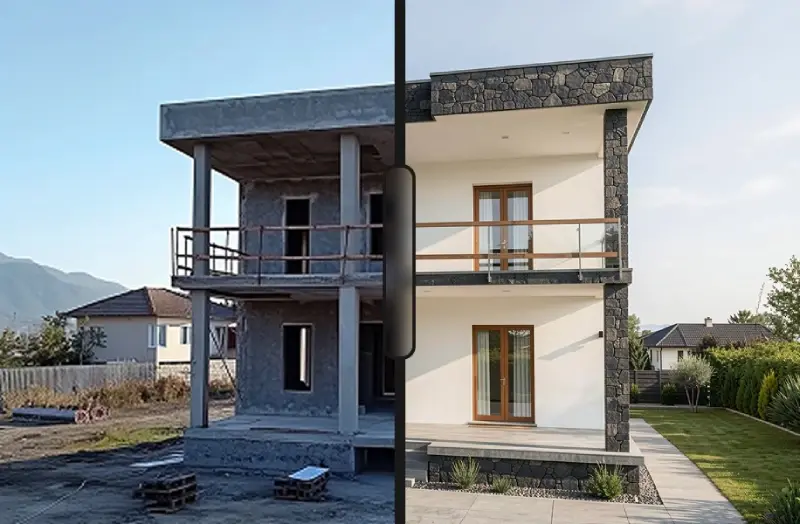
The image below shows a hand-drawn residential elevation sketch on the left and the ArchiGPT photorealistic render on the right. The AI preserved the roofline, fenestration pattern, and massing while adding realistic materials, landscaping, and atmospheric lighting.
Results like these typically take under 30 seconds. You can test the sketch to render AI workflow with your own drawings using ArchiGPT's free tier to evaluate the output quality firsthand.

Sketch to Render AI Use Cases - Architecture, Interior Design, Real Estate, and Urban Planning
Different professionals have different pain points. Below are role-specific workflows that show how sketch to render AI fits into each discipline.
Architects - From Concept Sketches to Client-Ready Presentations
In the earliest project phases, architects produce dozens of concept sketches to explore massing, orientation, and spatial relationships. Traditionally, turning any of these into a presentable image required modeling in Rhino or SketchUp and rendering through V-Ray or Enscape.
AI rendering removes that bottleneck. A quick massing study sketch becomes a photorealistic exterior visualization in seconds, enabling faster client feedback loops and reducing the time cost of design iteration. Architects can also explore different perspectives of a building from a single sketch input to build out a more complete presentation set.
This is especially valuable during competition submissions, where firms need compelling visuals under tight deadlines and may not have the budget for full 3D visualization on speculative work.
Interior Designers - Visualizing Material Palettes and Spatial Layouts
Interior designers often work from hand-drawn perspective sketches and mood boards. Sketch to render AI bridges the gap between a rough layout and a fully realized interior visualization. Upload a floor plan sketch, specify a material palette (walnut flooring, brass fixtures, linen upholstery), and receive a render that clients can react to immediately.
You can also change the design style of an interior render after generation to quickly compare Scandinavian, industrial, or mid-century modern directions. This can reduce the need for preliminary 3D models in tools like SketchUp during concept presentations.
Real Estate Agencies - AI-Staged Renders for Property Listings and Marketing
Vacant or under-construction properties are difficult to sell with empty-room photographs alone. AI-generated staging renders furnish and decorate a space digitally, helping buyers visualize the potential of a listing.
For new developments, a simple floor plan sketch can become a marketing-ready interior render in minutes. Agents can even place specific furniture pieces in a room to showcase sponsor brand partnerships or target buyer demographics. This reduces dependency on expensive photography and physical staging, which can represent significant cost savings for agencies managing large portfolios.
Urban Planners - Communicating Streetscape and Public Space Concepts
Urban planners need to communicate design proposals to community stakeholders and local authorities. Technical drawings rarely resonate with non-expert audiences who need to understand the lived impact of a proposal.
A sketch of a proposed streetscape or public plaza, rendered into a photorealistic visualization with AI, makes the vision tangible. AI rendering allows planners to produce multiple design options quickly for public consultation workshops, helping facilitate more informed community feedback.

Sketch to Render AI vs Traditional 3D Rendering Software
Sketch to render AI is not a universal replacement for traditional tools. Understanding when each approach fits is essential for building an efficient design workflow.
Speed and Cost - Seconds vs Hours of Production Time
A single AI render typically takes seconds to a minute. A comparable output from a traditional pipeline (3D modeling, texturing, lighting, rendering) can require hours of work, often spread across multiple software tools and potentially involving specialist visualization staff.
For early-stage concept work, this speed difference translates directly into time and cost savings. Firms can explore more design options in the same timeframe and budget.
Quality and Accuracy - When AI Renders Are Sufficient?
AI renders excel at conveying mood, materiality, and atmosphere. They are generally convincing enough for concept presentations, investor decks, and marketing materials where the goal is communicating design intent rather than technical precision.
They fall short when pixel-level accuracy matters. Precise mullion patterns, exact furniture models from a specification list, or technically accurate shadow studies for planning applications still require traditional 3D rendering software with precise geometric modeling.
Integration with Existing Design Software (Revit, SketchUp, Rhino)
Some tools, like Veras, plug directly into Revit. Others, including ArchiGPT, accept exports from SketchUp, Rhino, and other CAD tools as sketch inputs. This means sketch to render AI can slot into your existing pipeline rather than replacing it entirely.
The most productive approach for many studios is to use AI renders during concept and schematic design, then transition to traditional rendering software for developed design and construction documentation phases where dimensional accuracy is required.
When to Use AI Rendering vs When to Hire a Visualization Studio?
Use sketch to render AI for concept validation, quick client check-ins, social media content, and competition entries under tight deadlines.
Use a visualization studio for final marketing packages, animations, VR walkthroughs, and renders requiring precise product placement or technical accuracy.
Use both together by generating AI concepts first to align on direction with clients, then briefing a studio for the final polished deliverable.
Best Practices - How to Get the Best Results from Sketch to Render AI?
The quality of your output depends heavily on the quality of your input. These practical tips, drawn from working with these tools in professional architectural workflows, will help you extract maximum value from any sketch to render AI tool.
Sketch Preparation - Line Weight, Contrast, and Clarity
Use a dark pen or marker (0.5mm minimum) on white paper for maximum contrast.
Avoid shading or hatching in the sketch - let the AI handle textures and materials.
Ensure edges are clean and closed. Open lines can confuse the AI about where surfaces begin and end.
If photographing a hand-drawn sketch, use even lighting and avoid shadows falling across the paper.
Writing Effective Style and Material Prompts for AI Rendering
Good prompts are specific and use architectural language. Instead of writing "nice modern house," try: "two-story residential facade, white rendered walls, dark aluminum window frames, flat roof, warm evening light, landscaped front garden."
Structure your prompt in layers: building form first, then materials, then environment and lighting. This mirrors how most AI rendering systems process and prioritize information, and it tends to produce more predictable results.
Choosing the Right Output Resolution and Aspect Ratio
Match your output to its intended use. A 1080p render is typically sufficient for screen presentations and social media. For print boards or large-format displays, render at 4K or higher when your plan supports it.
Aspect ratio matters too. Use 16:9 for landscape views and presentation slides. Use 3:4 or 4:5 for portrait-oriented social media posts and Instagram content.
Post-Processing AI Renders - When and How to Refine Results?
AI renders rarely need heavy post-processing, but minor adjustments can elevate the final result. Common tweaks include color grading, adding people to your renders for scale and atmosphere, and correcting any minor AI artifacts such as distorted edges or inconsistent reflections.
Adobe Photoshop or Affinity Photo works well for this. A five-minute touch-up can turn a strong AI render into a portfolio-quality image.
Limitations of Sketch to Render AI - Honest Expectations
No technology is perfect. Understanding where sketch to render AI currently falls short will help you use it more effectively and set realistic expectations with clients and stakeholders.
Consistency Across Multiple Views and Iterations
One of the most significant current limitations is multi-view coherence. If you render the same building from different angles, the AI may alter facade details, window proportions, or material finishes between views. Each render is generated independently, so maintaining exact visual consistency requires careful prompt management and often manual post-production alignment.
For presentation sets requiring matched views, consider generating a primary hero image with AI and then using traditional modeling for supplementary angles, or use a tool that supports seed-locking to improve consistency.
Handling Complex Geometries and Structural Detail
AI performs well with typical building forms and straightforward massing. However, it can struggle with complex geometries like parametric facades, intricate curtain wall mullion patterns, or cantilevered structures with unusual proportions.
If your design features non-standard geometry, expect to invest more time in prompt refinement and post-processing. In some cases, a traditional 3D model will remain the more reliable path to an accurate representation.
Copyright and Ownership of AI-Generated Renders
Copyright law around AI-generated images is still evolving in most jurisdictions. As of 2026, many countries have not issued definitive rulings on the intellectual property status of AI outputs. The World Intellectual Property Organization (WIPO) provides ongoing updates on the international policy landscape around AI and IP.
Most commercial sketch to render AI platforms grant users a license to use generated images for business purposes under their terms of service. Review the specific terms for any tool you adopt, especially before using renders in legally binding documents, published marketing, or contexts where IP ownership may be contested.
Accuracy for Construction Documentation vs Conceptual Visualization
AI renders are not dimensionally accurate. They should never be used as construction documentation or relied upon for precise technical communication to contractors or engineers.
Their strength lies in conceptual visualization, mood communication, and design storytelling. Keep them in the ideation and marketing phases of your project timeline, and ensure all stakeholders understand the distinction between a concept render and a technical deliverable.
Sketch to Render AI Pricing and Plans Compared
Cost is a key factor when selecting a sketch to render AI tool. Below is a breakdown of common pricing models and what to expect at each tier based on publicly available plan information as of May 2026.
Free Sketch to Render AI Options - What You Get and What You Sacrifice?
Several tools offer free tiers, including ArchiGPT, Gendo AI, PromeAI, and RenderNet AI. Free plans typically limit monthly render counts (generally 5 to 20 renders), cap resolution at 1080p, and restrict access to premium style libraries.
Free tiers are useful for testing a platform and occasional personal projects. For client-facing work, the resolution and customization limits usually necessitate upgrading to a paid plan to meet professional presentation standards.
Subscription Models vs Pay-Per-Render Pricing
Most platforms use monthly or annual subscriptions with tiered render allowances. Individual subscriptions typically range from roughly $10 to $50 per month, scaling by render volume, resolution access, and feature availability.
A few tools offer pay-per-render credits, which suit users with irregular or low-volume needs. However, per-render costs are usually higher than subscription equivalents for users who render consistently.
Team and Enterprise Plans for Design Studios and Agencies
Studios with multiple users should look for team plans that include shared workspaces, centralized billing, and admin controls. Enterprise pricing is typically custom-quoted and may include dedicated support, priority rendering queues, and API access for workflow integration.
Not all sketch to render AI tools offer team features. If collaboration is critical to your workflow, filter your shortlist early for platforms that support it natively rather than expecting to retrofit solo-user tools for studio use.
ArchiGPT Pricing - Plans for Individual Architects and Agencies
ArchiGPT offers a free tier for individual exploration, professional plans starting at $29 per month, and custom enterprise plans for agencies and large studios. All paid plans include high-resolution exports, full style library access, and team collaboration features.
Visit the ArchiGPT pricing and plans page for the latest plan details and to compare options based on your team size and rendering volume.
Frequently Asked Questions
Can AI turn a hand-drawn sketch into a photorealistic render?
Yes. Modern sketch to render AI tools use diffusion models and ControlNet to interpret hand-drawn lines and generate photorealistic images. You photograph or scan the sketch, upload it, specify materials and style, and the AI produces a rendered visualization typically within seconds. Results are best when the sketch has clean, high-contrast line work.
What is the best sketch to render AI tool for architects in 2026?
ArchiGPT is a strong purpose-built option for architects and designers, offering architecture-specific style libraries and team collaboration features. Other notable contenders include Veras for Revit users, Gendo AI for rapid concept ideation, and PromeAI for interior design workflows. The best choice depends on your profession, existing software ecosystem, and whether you need collaboration features.
Is there a free sketch to render AI tool?
Several platforms offer free tiers, including ArchiGPT, Gendo AI, PromeAI, and RenderNet AI. Free plans typically limit render counts to approximately 5 to 20 per month, cap output resolution at 1080p, and restrict premium style options. They are suitable for testing and occasional personal use but may not meet professional presentation standards for client-facing work.
How long does sketch to render AI take to produce a visualization?
Most sketch to render AI tools generate a photorealistic image in 10 to 60 seconds. Speed depends on the platform, selected resolution, and current server load. This is significantly faster than traditional 3D rendering pipelines, which can take minutes to hours per image depending on scene complexity and hardware.
What file formats work with sketch to render AI tools?
Common supported input formats include JPEG, PNG, PDF, and SVG. Some tools also accept direct exports from CAD software like Revit, SketchUp, and Rhino. For hand-drawn sketches, a clear phone photo in JPEG or PNG format works well as long as the lines are high-contrast and the background is clean.
Are AI-generated architectural renders good enough for client presentations?
For concept-stage presentations, marketing materials, and investor decks, AI renders are generally effective. They convey mood, materiality, and spatial character convincingly. However, they are not suitable for technically precise deliverables like construction documentation or renders requiring exact product specifications and dimensional accuracy.
Can sketch to render AI replace traditional 3D visualization software?
Not entirely. AI rendering excels at speed and cost efficiency during early design phases. Traditional 3D visualization remains essential for complex geometries, animations, VR experiences, and projects requiring dimensional accuracy. The most effective approach for many studios uses both methods at different project stages.
How much does sketch to render AI typically cost?
Individual subscription plans generally range from $10 to $50 per month depending on the platform and features. Free tiers exist but with limitations on render volume and resolution. Team and enterprise plans are priced higher or custom-quoted. Pay-per-render credit systems are available on some platforms for users with lower volume needs. You can compare ArchiGPT plans and pricing for a detailed breakdown.
Do sketch to render AI tools support team collaboration and shared workspaces?
Some do and some do not. ArchiGPT, for example, offers shared project workspaces, team dashboards, and client sharing links as core features. Other tools like Midjourney with ControlNet are designed primarily for individual use. If collaboration matters to your studio, prioritize platforms with native team features when evaluating options.