Updated on: 24 May 2026
Previous post
Add paragraph text. Click “Edit Text” to update the font, size and more. To change and reuse text themes, go to Site Styles.
Next post
Add paragraph text. Click “Edit Text” to update the font, size and more. To change and reuse text themes, go to Site Styles.
Design professionals who still rely on fully manual pipelines are watching competitors deliver compelling concepts in a fraction of the time. The shift toward an ai assisted design workflow is not about replacing creative judgment - it is about amplifying it at every project stage, from site analysis through client handoff.
This guide provides a practical, tool-agnostic framework to help you understand, evaluate, and implement AI augmentation in your practice. We cover the core stages of a complete workflow, map specific tools to each phase, share practical prompt templates, outline discipline-specific variants for architecture, interior design, urban planning, and real estate, and give you a clear roadmap for measuring return on investment.
What Is an AI-Assisted Design Workflow?
An ai assisted design workflow is a structured process where artificial intelligence tools augment human creativity at key stages of design - from initial concept generation and spatial analysis to material selection, rendering, and client iteration.
Rather than replacing the designer, AI accelerates repetitive tasks, expands the range of options explored, and reduces time-to-deliverable across the entire project lifecycle.
AI-Assisted vs. AI-Generated Design - Key Differences
The distinction matters for professional practice and liability. AI-assisted design keeps the human designer in control of every decision. AI-generated design implies the machine produces a final output with minimal human guidance.
Understanding this boundary is essential for regulatory compliance, client communication, and professional accountability.
In practice, most professionals operate in the AI-assisted zone. They use generative design tools to explore massing options, diffusion models to visualize material palettes, and machine learning algorithms to optimize spatial layouts - all while retaining final authority over every deliverable.
Where AI Fits in the Human-Led Design Process?
AI integrates at specific friction points rather than replacing entire phases. It excels at tasks that involve pattern recognition, rapid iteration, and visual synthesis.
Think of it as a high-speed assistant that handles the computational heavy lifting so you can focus on design intent, client relationships, and regulatory compliance - the areas where human expertise remains irreplaceable.
Concept generation - AI proposes dozens of form studies in minutes instead of hours
Spatial analysis - machine learning interprets site context, sun paths, and circulation patterns
Material exploration - text-to-image synthesis produces photorealistic material mockups for evaluation
Rendering - real-time rendering engines powered by neural networks reduce visualization timelines significantly
Documentation - AI-powered annotation and drawing generation accelerates construction documentation production
Why AI-Assisted Design Matters for Professionals in 2026?
The design industry has reached an inflection point. Clients increasingly expect faster delivery, richer visualization, and more options at every presentation. Firms that integrate AI into their pipelines are winning more projects because they can demonstrate design thinking at a pace traditional methods cannot match.
Industry surveys - including guidance published by the American Institute of Architects - indicate that a growing majority of mid-to-large architecture firms have adopted at least one AI tool in their workflow.
For interior designers and real estate agencies, the adoption curve is steeper due to lower entry barriers and immediate visual payoff. While precise figures vary by survey methodology and sample, the directional trend is clear: AI augmentation is becoming a baseline expectation across design disciplines.

Why Architects and Designers Are Adopting AI-Assisted Workflows?
Adoption is driven by measurable outcomes, not hype. Design professionals are tracking concrete improvements across project timelines, client satisfaction scores, and operational costs.
Reported Time Savings Across Project Phases
The following ranges represent commonly reported benchmarks from firms that have documented their AI adoption outcomes. Actual results vary depending on project complexity, team skill, and how thoroughly AI is integrated.
Research on construction and design productivity from organizations such as McKinsey provides broader context for these efficiency gains.
Concept phase: 50-80 percent time reduction reported when AI generates initial form studies and massing options
Material and style exploration: tasks that traditionally took 8-12 hours can often complete in 1-2 hours using text-to-image synthesis
Rendering and visualization: AI-accelerated engines deliver photorealistic outputs in minutes rather than overnight render queues
Documentation: AI annotation tools have been shown to reduce drawing production time by approximately 30-45 percent in structured implementations
Client Satisfaction and Revision Cycle Improvements
Firms using an ai assisted design workflow commonly report 40-60 percent fewer client revision cycles. The reasoning is straightforward. When you present more options earlier with higher visual clarity, clients make informed decisions sooner. This reduces the misunderstandings that typically trigger costly rework.
Interior design studios specifically note that AI-generated mood boards and spatial visualizations help clients commit to design directions during the first presentation instead of the third.
Tools that generate mood boards from existing renders accelerate this process by producing bespoke visual references that match the exact design direction rather than relying on generic stock imagery.
Competitive Pressure and Industry Adoption Rates
Competitive pressure is real. Firms that already use AI can submit proposals with richer visuals in shorter response windows. This creates a tangible disadvantage for practices still relying on manual-only workflows.
Industry adoption rates have climbed steadily. Multiple surveys suggest that a majority of architecture firms now use at least one AI tool, up significantly from just two years ago.
Among real estate agencies, virtual staging adoption has accelerated rapidly for premium listings, driven by strong cost-per-image economics. Exact percentages vary by region and survey source, but the trajectory is consistent across markets.
Cost-Effectiveness of AI-Assisted Design vs. Traditional Methods
The financial case is compelling. Traditional rendering services typically cost $500-$2,000 per image depending on complexity and market. AI-assisted visualization tools produce comparable quality for a fraction of that - often under $50 per image when factoring in subscription costs and staff time, though quality varies by tool and prompt sophistication.
For small and mid-size firms, this means high-quality visual storytelling is no longer gated behind expensive outsourcing. The democratization of visualization quality is one of the strongest adoption drivers across all design disciplines.

Core Stages of an AI-Assisted Design Workflow
A complete ai assisted design workflow spans eight core stages. Each stage has defined inputs, specific AI actions, and clear outputs. The following framework applies across disciplines - subsequent sections adapt it to architecture, interior design, urban planning, and real estate.
Stage 1 - Project Brief and Constraint Input
Definition: The designer translates client requirements, site constraints, and regulatory parameters into structured data that AI tools can process. Inputs include program requirements, budget ranges, site dimensions, zoning codes, and stylistic preferences. AI tools at this stage help organize and parse unstructured brief documents.
Natural language processing extracts key constraints and flags potential conflicts. The output is a structured constraint set ready for downstream generation. Human review at this stage is critical - AI may misinterpret ambiguous brief language or miss implied requirements.
Stage 2 - Site Analysis and Contextual Intelligence
Definition: AI analyzes site context including topography, solar orientation, surrounding urban morphology, vegetation, and infrastructure. Inputs are GIS data, satellite imagery, and local climate datasets.
Machine learning models identify patterns in surrounding built form, predict shadow impacts, and recommend optimal building placement. For site documentation, AI capabilities such as coloring and annotating site plans streamline the visual communication of contextual data.
The output is a contextual intelligence report with visualized constraints. All site analysis outputs should be verified against official survey data and local authority records.
Stage 3 - AI-Powered Concept and Massing Generation
Definition: Generative design algorithms produce multiple massing options that satisfy the constraint set from Stage 1 and the contextual data from Stage 2. Inputs are the structured brief plus site analysis outputs.
Parametric design tools like Grasshopper combined with AI solvers produce dozens of volumetric studies in minutes. Autodesk's documentation on generative design in architecture provides additional technical background on these approaches. Text-to-image models visualize conceptual forms for early communication.
The output is a curated set of 5-15 viable massing options ranked by constraint satisfaction. It is important to note that AI-generated massing studies require professional verification for structural feasibility and code compliance before being presented as buildable options.
Stage 4 - Style, Material, and Spatial Exploration
Definition: The designer explores material palettes, facade treatments, interior finishes, and atmospheric qualities using AI-driven image synthesis.
Inputs are selected massing options plus stylistic direction from the client. Diffusion models and style transfer algorithms generate photorealistic visualizations of material combinations.
Designers can rapidly apply textures to furniture elements or swap textures on key architectural elements to compare finishes side by side. The output is a refined set of design directions with visual documentation of material and spatial character.
Material representations should be cross-referenced with actual product specifications, as AI-generated textures may not precisely match real-world material properties.
Stage 5 - Iterative Refinement With AI Feedback Loops
Definition: The designer enters a rapid iteration cycle, adjusting parameters, prompts, and constraints to hone the design toward the optimal solution. Inputs are client feedback, internal critique notes, and performance metrics.
AI tools enable near-instant regeneration of alternatives. Prompt chaining techniques allow progressive refinement without starting from scratch. The output is a narrowed design direction - typically 2-3 options - ready for high-fidelity development.
Stage 6 - High-Fidelity Rendering and Visualization
Definition: Selected design directions are rendered at presentation quality using AI-accelerated rendering engines.
Inputs are 3D model data, material libraries, and lighting specifications. Neural network-based denoisers and real-time rendering tools produce photorealistic imagery in minutes.
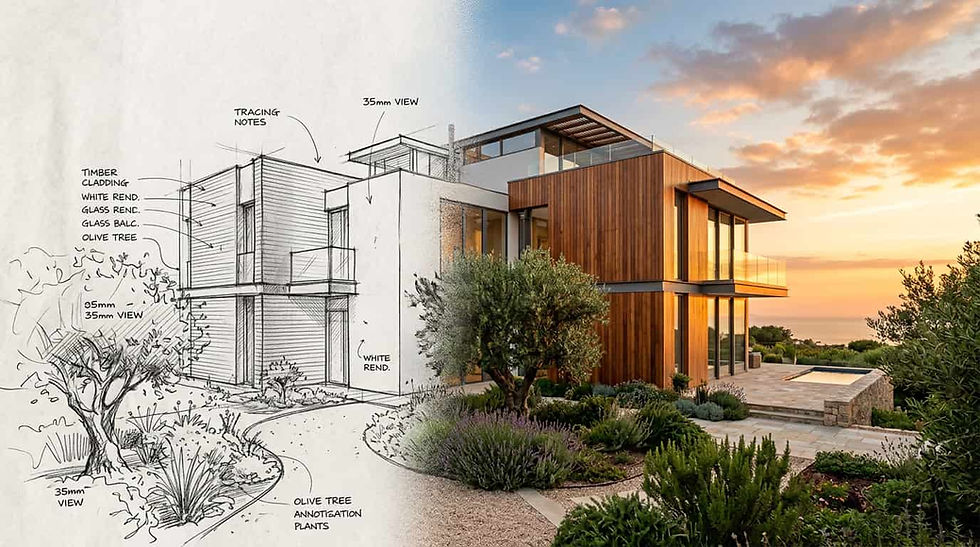
AI upscaling enhances resolution. Architects can also generate photorealistic renders directly from elevation drawings, bypassing the need for a full 3D model in early presentation stages.
The output is a set of client-ready visualization assets including stills, animations, and virtual walkthroughs.
These should be clearly labeled as design visualizations rather than construction-accurate representations.
Stage 7 - Documentation, Annotation, and Deliverable Export
Definition: AI assists in generating construction documentation, dimensioned drawings, and annotated deliverables from the 3D model. Inputs are the refined BIM or CAD model plus documentation standards.
AI-powered BIM tools auto-generate schedules, section cuts, and detail callouts. Capabilities such as converting images into 2D technical drawings further accelerate the transition from concept visuals to dimensioned documentation. The output is a coordinated set of deliverables ready for regulatory submission or contractor coordination.
All AI-generated documentation must be reviewed by a licensed professional before submission - automated outputs frequently contain dimensional inaccuracies or annotation errors that require human correction.
Stage 8 - Client Presentation and Collaborative Iteration
Definition: The designer presents AI-enhanced deliverables to the client and uses real-time AI tools to iterate collaboratively during the meeting. Inputs are prepared presentation assets plus live client feedback.
Real-time generation tools allow on-the-spot adjustments to materials, layouts, and styling based on client reactions. The output is a confirmed design direction with documented change requests - reducing post-meeting revision cycles significantly.
Setting client expectations about the exploratory nature of live-generated imagery is essential to avoid misinterpretation of rough outputs as final design commitments.

AI Tools for Each Phase of the Design Process
Tool selection should match your workflow phase and discipline - not vendor marketing. The following table maps representative AI solutions to each stage of the ai assisted design workflow.
This is not an exhaustive endorsement of any single platform but a practical reference for building your toolkit. Tool capabilities and pricing evolve rapidly, so verify current features directly with each provider before committing.
Concept and Ideation Tools
These tools help generate initial visual concepts from text descriptions or rough sketches. They excel at rapid form exploration and stylistic iteration.
Spatial Analysis and Generative Massing Tools
Parametric and generative platforms produce volumetric studies that satisfy multiple constraints simultaneously. They integrate with existing CAD environments.
Material and Style Exploration Platforms
Diffusion-based image synthesis tools visualize material combinations and atmospheric qualities from text prompts, enabling rapid palette development.
AI-Powered Rendering and Visualization Engines
AI-accelerated renderers produce photorealistic outputs from 3D model data in significantly reduced timeframes compared to traditional path-tracing engines.
Documentation and BIM Integration Tools
These tools automate drawing generation, schedule creation, and annotation tasks within BIM environments like Revit.
Client Communication and Virtual Staging Tools
Virtual staging and real-time presentation tools help communicate design intent to non-technical audiences, particularly valuable for real estate agencies.

AI Prompt Engineering for Architects and Designers
Prompt engineering is the highest-leverage skill for design professionals adopting an ai assisted design workflow. A well-structured prompt produces dramatically better outputs than generic instructions. The following examples are organized by workflow stage and ready to adapt to your projects.
Anatomy of an Effective Design Prompt
Every effective design prompt contains four components: context (project type and constraints), subject (what you want to see), style (visual language and references), and technical parameters (resolution, aspect ratio, rendering quality).
The order matters. Lead with context so the AI understands the design domain. Follow with the specific subject. Layer in style and atmosphere last.
This structure consistently produces more relevant architectural outputs based on extensive prompt testing across multiple platforms.
Prompts for Concept Generation and Massing
Use these prompts when exploring initial volumetric forms and building relationships to site.
Prompt 1: "Residential architecture, two-story single-family home on a sloped site, 200 square meters footprint, cantilevered upper floor, exposed concrete and timber cladding, Pacific Northwest forest context, overcast sky, photorealistic exterior perspective, eye-level view"
Expected output: A photorealistic exterior rendering showing massing, materiality, and site relationship. Iterate by adjusting the cantilever direction, material balance, or roof form.
Prompt 2: "Urban mixed-use building, 8 stories, ground-floor retail with setback, upper residential with private balconies, contemporary facade with vertical louvers, narrow urban infill site, Mediterranean climate, golden hour lighting, street-level perspective"
Prompts for Material and Palette Exploration
Prompt 3: "Interior material palette study, warm minimalism, white oak flooring, limewash plaster walls, brushed brass hardware, natural linen upholstery, indirect warm lighting, flat lay composition, top-down view, studio lighting"
Expected output: A mood-board-style flat lay showing materials in relation to each other. Iterate by swapping individual materials while keeping the composition structure.
Prompt 4: "Facade material exploration, weathering steel panels combined with white precast concrete, parametric perforation pattern, dappled shadow play on interior, detail view at 1:20 scale, overcast diffused light"
Prompts for Interior Layout and Furniture Arrangement
Prompt 5: "Open-plan living room, 45 square meters, Scandinavian modern style, low-profile sofa facing floor-to-ceiling glazing, dining area for six integrated at rear, built-in joinery wall unit, warm oak and white palette, natural daylight from south, wide-angle interior perspective"
Expected output: A furnished interior perspective showing spatial arrangement and furniture scale. Iterate by changing the sofa orientation, adding a kitchen island, or shifting the color temperature.
Prompt 6: "Compact studio apartment, 28 square meters, multifunctional furniture, Murphy bed with integrated desk, kitchen galley along one wall, floor-to-ceiling storage, Japanese-inspired minimalism, axonometric view showing space planning"
Prompts for Rendering Style and Atmosphere Control
Prompt 7: "Luxury penthouse terrace at dusk, infinity pool reflecting twilight sky, city skyline in background, warm interior glow from recessed lighting, contemporary outdoor furniture, subtropical planting, cinematic composition, shallow depth of field, hyperrealistic rendering"
Expected output: A highly atmospheric visualization suited for client presentation or marketing. Iterate by adjusting time of day, weather conditions, or camera angle.
Iterating and Refining - Prompt Chaining Techniques
Prompt chaining means building on previous outputs rather than starting fresh. After generating a base image, use follow-up prompts that reference the established composition.
Prompt 8 (chain example): "Same composition as previous, but replace timber cladding with dark zinc panels, add a green roof with native grasses, maintain the same camera angle and lighting conditions"
This technique preserves design decisions you have already validated while testing specific variations. It mirrors the iterative sketching process designers already use - just at significantly faster speed.
Not all AI platforms support prompt chaining equally, so test this workflow with your specific tools before relying on it for client-facing production.

How to Integrate an AI-Assisted Design Workflow Into Your Existing Pipeline?
Integration should follow a phased approach. Rushing to adopt every available AI tool creates confusion and workflow disruption. The following roadmap provides realistic timelines and connects to tools your team likely already uses.
Auditing Your Current Workflow for AI Opportunities
Timeline: Weeks 1-2. Map every step in your current project delivery process. Identify bottlenecks, repetitive tasks, and phases where you lose the most time. Common pain points include concept iteration speed, rendering turnaround, and revision management.
Document how long each phase takes on a typical project. This baseline is essential for measuring improvements later. Focus on tasks where output volume matters more than singular creative insight.
Starting Small - Pilot Projects and Low-Risk Entry Points
Timeline: Weeks 3-6. Choose one or two low-stakes projects to test AI tools. Internal projects, competition entries, or early-stage feasibility studies work well because the consequences of imperfect outputs are minimal.
Start with concept visualization or material exploration. These phases offer immediate visual feedback and do not require deep integration with BIM systems. Track time spent versus traditional methods on the same tasks to build your own performance data.
Connecting AI Outputs to BIM and CAD Environments
Timeline: Weeks 7-12. Once you have validated AI tools on isolated tasks, begin connecting them to your production environment. This means establishing workflows between AI image outputs and your Revit, SketchUp, Rhino, or AutoCAD pipelines.
Rhino and Grasshopper: Use AI-generated massing as reference geometry for parametric development
Revit: Import AI-generated floor plans as underlay references for BIM model construction
SketchUp: Use AI concept images as texture references and facade studies
AutoCAD: Overlay AI-generated site analyses on base drawings for design development
Training Your Team and Building Shared Prompt Libraries
Timeline: Weeks 8-14 (overlapping with previous phase). Create a shared prompt library organized by project type and workflow stage. Document which prompts produce the best results for your firm's typical project types.
Run short training sessions - 60 to 90 minutes - focused on practical prompt writing rather than AI theory. Pair experienced prompt users with team members who are still learning. Consistency in prompt structure across the team improves output predictability.
Scaling From Experimentation to Standard Practice
Timeline: Months 4-6. After validating results on pilot projects and training your team, formalize AI tools into your standard operating procedures. Update project templates to include AI-assisted milestones. Set quality checkpoints where designers verify AI outputs against design intent and technical requirements.
Measure results against your Week 1-2 baseline. Many firms report meaningful efficiency gains within 3-4 months of structured adoption. Continue refining prompt libraries as new tools and capabilities emerge.

Discipline-Specific AI-Assisted Design Workflow Variants
The core eight-stage ai assisted design workflow adapts differently depending on your discipline. Each profession has unique deliverables, client expectations, regulatory contexts, and points where AI delivers the most value.
Architects - From Site Analysis to Construction Documents
Architects operate within strict regulatory frameworks including building codes, zoning ordinances, and accessibility standards. The AI-assisted workflow for architecture must respect these constraints at every stage.
At the schematic design phase, AI excels at generating massing studies that satisfy setback requirements, height limits, and floor area ratios. Parametric tools combined with AI solvers can test hundreds of configurations against zoning parameters in minutes.
During design development, AI visualization tools help communicate material and spatial qualities to clients before committing to detailed BIM modeling. This reduces expensive model rework.
Designers can explore different perspectives of a building to test how massing reads from street level, aerial views, and neighboring properties. At the construction documentation phase, AI annotation and schedule generation tools accelerate production of coordinated drawing sets.
Key architectural deliverables where AI adds the most value include site analysis reports, concept presentations, design development packages, and marketing renders for competition submissions.
The critical human checkpoint remains structural feasibility verification and code compliance review by a licensed professional.
Interior Designers - Concept Boards to Client Walkthroughs
Interior designers work in a faster-paced, highly visual client environment where aesthetic alignment must happen quickly. AI tools deliver outsized value in the early concept and material exploration phases.
Mood board generation is one of the strongest AI use cases for interiors. Instead of manually curating images from multiple sources, designers can generate bespoke visualizations that closely match their concept direction. This reduces the compromise of using stock photography that only approximates the design intent.
Space planning benefits from AI-generated layout options that test furniture arrangements against circulation requirements. For client presentations, AI-rendered perspectives showing proposed interiors within the actual space geometry create stronger emotional connection.
Designers can change the design style of an interior in seconds to compare Scandinavian, mid-century, or Japanese-inspired directions side by side. Virtual walkthroughs produced by AI rendering engines allow clients to experience the design before any physical work begins.
The typical interior design workflow emphasizes speed of iteration and visual fidelity over technical documentation depth. AI tools that produce high-quality imagery from minimal 3D input - or even from floor plan sketches alone - are particularly valuable for this discipline.
Urban Planners - Massing Studies to Community Presentations
Urban planners deal with larger scales, longer timelines, and diverse stakeholder groups including government officials, community members, and development partners. AI helps bridge the communication gap between technical planning data and public understanding.
At the analysis stage, AI processes urban morphology data, population density patterns, transportation networks, and environmental factors at a scale and speed that manual analysis cannot match. Generative massing tools produce district-level volumetric studies that satisfy density targets while respecting existing neighborhood character.
One of the most impactful AI applications for urban planners is stakeholder communication. AI-generated visualizations of proposed developments help community members understand the spatial impact of planning decisions.
Before-and-after views generated in hours replace expensive 3D modeling that previously took weeks.
Sustainable design considerations including solar access, wind patterns, heat island effects, and green space distribution can all be analyzed and visualized using AI tools, making environmental performance legible to non-technical audiences.
These outputs should be validated against simulation-grade environmental analysis tools before informing regulatory submissions.
Real Estate Agencies - Virtual Staging and Listing Visualization
Real estate agencies have different priorities than design professionals. Speed, visual appeal, and cost-per-image drive their workflow decisions. AI virtual staging has become nearly standard practice for competitive listings.
The AI workflow for real estate starts with empty property photography. AI staging tools furnish and decorate these spaces in multiple styles within minutes, producing listing imagery that drives higher engagement and can contribute to faster sales.
Agencies can place furniture into a room using AI to produce staged images without hiring physical staging companies or scheduling photography sessions with furniture.
Beyond staging, AI helps real estate agencies visualize renovation potential. Showing buyers what a dated property could look like after modernization - with updated kitchens, bathrooms, or facade treatments - removes imagination barriers that can stall purchasing decisions. Property visualization at this quality previously required hiring architects or renderers at significant cost.
The key deliverables for real estate include virtually staged interiors, exterior renovation visualizations, floor plan renderings, and neighborhood context imagery. Speed and cost-per-image are the primary metrics - most agencies need results within hours, not days.
It is worth noting that virtual staging disclosures may be required by local real estate advertising regulations, so agencies should verify compliance requirements in their market.
Real-World Case Studies and Benchmarks
The following case studies represent composite scenarios based on typical outcomes reported by firms adopting AI-assisted design workflows.
They illustrate realistic benchmark ranges rather than guaranteed results, as actual outcomes depend on project type, team experience, and integration depth.
Residential Architecture - Concept Phase Reduced From 40 Hours to 8 Hours
Before AI: A mid-size architecture firm spent approximately 40 hours on concept development for a custom residential project. This included manual sketching, physical model building, two rounds of 3D massing in SketchUp, and outsourced concept renders.
After AI: The same firm now generates 20-30 massing options using parametric AI tools in under 3 hours. AI rendering produces presentation-quality concept images in another 2-3 hours. Total concept phase time: approximately 8 hours - representing roughly an 80 percent reduction in time-to-concept presentation.
The additional benefit is broader exploration. With 40 hours of manual work, the firm typically explored 3-4 options. With 8 hours of AI-assisted work, they explore 15-20 options and present the strongest 5 to the client. This breadth of exploration often leads to stronger design outcomes and faster client alignment.
Interior Design Studio - Client Revision Cycles Reduced Significantly
Before AI: An interior design studio averaged 4-5 revision cycles per project. Each revision took 3-5 days to produce updated visualizations. Clients struggled to commit because 2D material boards did not convey spatial atmosphere.
After AI: The studio now presents AI-generated photorealistic room visualizations at the first client meeting. Clients see their space furnished and lit before any purchasing decisions. Average revision cycles dropped to approximately 1.5-2.0, and total project timeline shortened by an estimated 3-4 weeks.
Urban Planning Team - Community Visualization Delivered in Days Instead of Weeks
Before AI: A municipal planning team needed 4-6 weeks to produce community presentation materials for a proposed mixed-use development. This required hiring a visualization consultant, building a detailed 3D model, and rendering multiple viewpoints.
After AI: Using AI-powered visualization tools, the team now produces community-facing imagery in 3-5 days. They generate before-and-after street views, aerial perspectives, and pedestrian-level visualizations from basic massing models. Reported cost savings exceeded 70 percent compared to outsourced visualization, though quality trade-offs may exist depending on the level of architectural detail required.
Real Estate Agency - Listing Imagery Produced at a Fraction of Traditional Cost
Before AI: A real estate agency spent $1,500-$3,000 per listing on professional staging photography. Physical staging required furniture rental, logistics coordination, and multiple photographer visits.
After AI: AI virtual staging now produces listing imagery for $100-$300 per property. Turnaround dropped from 5-7 days to same-day delivery. The agency increased its staged listing percentage from approximately 30 to 95 percent without proportional cost increases. Quality varies by AI tool and photographer input quality, so agencies should evaluate outputs against their brand standards.
Common Pitfalls and Limitations of AI-Assisted Design Workflows
No technology is without limitations. Understanding and managing these pitfalls is what separates successful AI adoption from frustrating experimentation. Honest assessment of current constraints builds better workflows and protects your professional credibility.
Over-Reliance on AI Outputs Without Design Judgment
AI produces visually appealing images that may not be architecturally sound. A beautiful massing study might violate setback requirements. A stunning interior visualization might show furniture that does not fit the actual room dimensions.
Mitigation: Treat every AI output as a starting point, never a final answer. Establish review checkpoints where experienced designers verify feasibility before presenting to clients or advancing to production.
Accuracy and Structural Feasibility Concerns
Current AI tools do not understand structural engineering principles. They generate forms that look convincing but may be impossible to build. Cantilevers without adequate support, impossible span-to-depth ratios, and physically unrealistic material applications are common in raw AI outputs.
Mitigation: Use AI outputs for visual and spatial exploration only. Route all structural decisions through qualified engineers. Never present AI-generated forms to clients as buildable designs without professional engineering verification.
Style Homogeneity and the Risk of Generic Aesthetics
AI models are trained on existing imagery, which means they tend to reproduce dominant aesthetic trends. Without deliberate prompt specificity, outputs gravitate toward a generic contemporary minimalism that lacks distinctiveness.
Mitigation: Develop highly specific prompts that reference unique material combinations, regional vernacular, or unconventional spatial arrangements. Use AI as a departure point and layer your own design voice on top. Build firm-specific style guides into your prompt libraries.
Data Privacy and Intellectual Property Considerations
Uploading client project data to cloud-based AI services raises legitimate privacy questions. Additionally, the intellectual property status of AI-generated imagery remains legally unsettled in many jurisdictions.
Resources from organizations such as the National Institute of Standards and Technology and the World Intellectual Property Organization provide useful frameworks for navigating these concerns.
Mitigation: Review the data usage policies of every AI tool before uploading client information. Use enterprise-tier services with clear data protection guarantees for commercial projects. Establish clear ownership terms in client contracts regarding AI-generated deliverables. Consult legal counsel on IP questions specific to your jurisdiction.
Managing Client Expectations Around AI-Generated Visuals
AI-generated images look impressively realistic. Clients may assume that what they see is exactly what will be built - down to the last detail. This creates expectation gaps when construction reality introduces material substitutions, budget adjustments, or engineering compromises.
Mitigation: Clearly communicate that AI visualizations represent design direction, not construction documentation. Label AI-generated images appropriately in presentations. Use progressive fidelity - show rougher imagery early and increase detail as the design firms up through traditional documentation. This approach manages expectations while still leveraging AI's speed advantage.
Measuring ROI of Your AI-Assisted Design Workflow
Demonstrating return on investment is essential for justifying AI tool subscriptions and training time to firm leadership. The following framework provides a structured approach to measuring the value of your ai assisted design workflow.
Key Metrics to Track Across Workflow Phases
Time-to-deliverable per project phase (hours from brief to concept, concept to development, development to documentation)
Number of design options explored per concept phase
Client revision count per project
Win rate on competitive proposals
Cost per visualization image produced
Team utilization rate (billable hours as percentage of total hours)
Calculating Time-to-Deliverable Improvements
Use this formula: Time Savings Percentage = (Traditional Hours - AI-Assisted Hours) divided by Traditional Hours, multiplied by 100. Apply this calculation to each workflow phase independently for the most actionable insights.
Typical benchmark ranges based on reported outcomes from firms with structured adoption programs:
Concept and massing phase: 50-80 percent time reduction
Material and style exploration: 60-75 percent time reduction
Rendering and visualization: 40-70 percent time reduction depending on complexity
Documentation: 30-45 percent time reduction
Client revision cycles: 40-60 percent fewer iterations
These ranges reflect reported outcomes and should be treated as directional benchmarks. Your firm's actual results will depend on project types, team skill levels, and how consistently AI tools are applied across the pipeline.
Quantifying Client Satisfaction and Win Rate Impact
Track your proposal win rate before and after AI adoption. Firms that have measured this metric typically report improvements in competitive win rates when proposals include richer visualization and more design options, though the magnitude varies by market and competition quality.
Client satisfaction can be measured through post-project surveys focusing on communication clarity, design exploration breadth, and timeline adherence. These metrics connect directly to repeat business and referral rates - making them valuable leading indicators of long-term firm growth.
Total Cost of Adoption vs. Efficiency Gains
Calculate total adoption cost by summing tool subscriptions, training hours (valued at hourly staff rate), and any temporary productivity loss during the learning period. Compare this against the value of hours saved multiplied by your billable rate.
Many firms achieve positive ROI within 2-4 months of structured adoption. As an illustrative example: a practice with a $150 hourly rate that saves 20 hours per project across 4 monthly projects recovers $12,000 in value - likely exceeding typical AI tool costs of $200-$500 per month.
You can review ArchiGPT's pricing plans for a representative example of current AI design tool costs. Individual results will depend on your specific fee structure and project volume.
The Future of AI-Assisted Design Workflows
The trajectory of AI capabilities in design is accelerating. Understanding what is emerging helps you prepare your practice for competitive shifts ahead. The following projections are based on current technology trajectories and published research roadmaps, though the pace of AI development means timelines may shift.
Emerging AI Capabilities on the Horizon
Near-term (1-2 years): Real-time collaborative AI that allows multiple team members to iterate on designs simultaneously. AI-powered code compliance checking that flags zoning violations during the design phase rather than during permit review. Energy modeling integrated directly into early massing tools.
Medium-term (3-5 years): Generative structural analysis that produces buildable structural solutions alongside architectural massing. AI systems that learn a firm's design language and propose options consistent with established aesthetic identity. Full 3D model generation from text or sketch inputs rather than 2D imagery alone.
These capabilities are in active development at multiple research labs and software companies, though production-ready implementations may take longer than optimistic projections suggest.
From Assistance to Collaboration - The Next Paradigm Shift
Current AI tools are primarily reactive - they respond to prompts. The next paradigm involves proactive AI collaborators that anticipate design problems, suggest alternatives unprompted, and maintain awareness of project constraints throughout the design process.
This shift would transform AI from a tool you use at specific moments into an always-available design partner that contributes context-aware suggestions. Early versions of this capability are appearing in computational design environments, though the technology is still maturing.
Is the AI-Assisted Design Workflow Becoming Industry Standard?
The evidence strongly suggests so. The question for most practices is no longer whether to adopt but how quickly and how thoroughly. Client expectations, competitive pressure, and the demonstrated productivity gains documented by organizations such as the Royal Institute of British Architects are converging to make AI-augmented delivery the baseline rather than the exception.
Within the next few years, clients will likely expect AI-quality visualization as standard in project proposals. Firms that have not integrated these capabilities risk facing the same kind of competitive disadvantage that practices experienced when they resisted CAD adoption in the 1990s.
Preparing Your Practice for the Next Five Years
Invest in prompt literacy across your entire team, not just one AI champion
Build flexible workflows that can absorb new AI capabilities as they emerge
Develop firm-specific training data through consistent prompt documentation and quality tracking
Maintain traditional design skills as the foundation - AI amplifies skill, it does not replace it
Monitor AI regulation developments in your jurisdiction regarding liability, intellectual property, and disclosure requirements
Frequently Asked Questions
What is an AI-assisted design workflow?
An AI-assisted design workflow is a structured process where artificial intelligence tools augment human designers at key project stages. It spans concept generation, spatial analysis, material exploration, rendering, and client presentation. The designer retains creative control while AI accelerates iteration speed and expands the range of options explored.
What is the difference between AI-assisted and AI-generated design?
AI-assisted design keeps the human designer in control of every decision, using AI as a productivity tool. AI-generated design implies the machine produces final outputs with minimal human input. Most professional practices operate in the AI-assisted mode, treating AI outputs as starting points that require expert refinement and verification.
Can AI replace architects and designers?
No. AI cannot replace the design judgment, regulatory knowledge, client relationship skills, and creative vision that architects and designers bring. It handles repetitive production tasks and accelerates exploration. The designer's role shifts from manual production toward curation, direction-setting, and quality verification - areas that require professional expertise and licensed accountability.
How much time does AI save in architectural design?
Reported benchmarks from firms with structured adoption programs show approximately 50-80 percent time savings in concept phases, 40-70 percent in rendering, and 30-45 percent in documentation. Total project timelines can shrink by 30-50 percent depending on project complexity and how thoroughly AI is integrated. Actual results vary by firm, project type, and team experience.
How do I integrate AI into my existing design workflow?
Follow a phased approach. Start by auditing current bottlenecks, then pilot AI tools on low-risk projects. Connect successful AI outputs to your BIM or CAD environment. Train your team on prompt engineering and build shared prompt libraries. Scale to standard practice over 3-6 months while measuring results against your baseline.
What are the limitations of AI in design workflows?
Key limitations include lack of structural engineering understanding, tendency toward generic aesthetics without specific prompting, inability to verify code compliance, and data privacy concerns with cloud-based tools. All AI outputs require professional verification before client presentation or construction advancement.
Can real estate agencies use AI-assisted design tools?
Yes. Real estate agencies use AI virtual staging to furnish empty properties digitally, visualize renovation potential for buyers, and produce listing imagery at a fraction of traditional photography and staging costs. Tools like ArchiGPT enable same-day delivery of staged listing images. Agencies should check local advertising disclosure requirements for virtually staged imagery.
How do interior designers use AI for client presentations?
Interior designers use AI to generate photorealistic room visualizations showing proposed furnishings, materials, and lighting within the actual space. This helps clients commit to design directions at the first presentation rather than requiring multiple revision cycles with abstract mood boards alone. AI-generated visualizations should be clearly labeled as design intent rather than exact construction representations.
Is AI-assisted design more cost-effective than traditional methods?
In many cases, yes. Traditional rendering services typically cost $500-$2,000 per image while AI tools can produce comparable quality for under $50 per image, depending on the platform and complexity. Many firms report achieving positive ROI within 2-4 months of structured adoption when factoring in time savings, reduced outsourcing, and faster client approvals. Results depend on your firm's specific workflow volume and fee structure.